2017年12月12日 星期二

Hadoop Client 建置 - Pig 基本使用方法

Prepare Hadoop Client

prereq.

  1. Install Hadoop and JDK package
  2. Configure PATH (JAVA_HOME and HADOOP_HOME)
  3. Edit core-site.xml
  4. Edit /etc/hosts to resolve Hadoop hosts 


unzip JDK and Hadoop to /home/ubuntu directory
Edit .bashrc file
ubuntu@HDClient:~$ echo $PATH
/home/ubuntu/bin:/home/ubuntu/.local/bin:/usr/local/sbin:/usr/local/bin:/usr/sbin:/usr/bin:/sbin:/bin:/usr/games:/usr/local/games:/home/ubuntu/jre1.8.0_151/bin:/home/ubuntu/hadoop-2.8.2/bin:/home/ubuntu/hadoop-2.8.2/sbin

Ensure java -version
Ensure hadoop version

Edit ubuntu@HDClient:~$ sudo more /home/ubuntu/hadoop-2.8.2/etc/hadoop/core-site.xml
:::
<configuration>
        <property>
                <name>fs.defaultFS</name>
                <value>hdfs://nn:8020</value>
        </property>
</configuration>

Hadoop Client Connection Testing
ubuntu@HDClient:~$ hdfs dfsadmin -report
Configured Capacity: 51908788224 (48.34 GB)
Present Capacity: 27684233216 (25.78 GB)
DFS Remaining: 27683569664 (25.78 GB)
DFS Used: 663552 (648 KB)
DFS Used%: 0.00%
Under replicated blocks: 0
Blocks with corrupt replicas: 0
Missing blocks: 0
Missing blocks (with replication factor 1): 0
Pending deletion blocks: 0

-------------------------------------------------
Live datanodes (2):

Name: 172.16.1.210:50010 (dn01)
Hostname: dn01
Decommission Status : Normal
Configured Capacity: 25954394112 (24.17 GB)
DFS Used: 331776 (324 KB)
Non DFS Used: 12095500288 (11.26 GB)
DFS Remaining: 13841784832 (12.89 GB)
DFS Used%: 0.00%
DFS Remaining%: 53.33%
Configured Cache Capacity: 0 (0 B)
Cache Used: 0 (0 B)
Cache Remaining: 0 (0 B)
Cache Used%: 100.00%
Cache Remaining%: 0.00%
Xceivers: 1
Last contact: Tue Dec 12 09:16:45 UTC 2017


Name: 172.16.1.211:50010 (dn02)
Hostname: dn02
Decommission Status : Normal
Configured Capacity: 25954394112 (24.17 GB)
DFS Used: 331776 (324 KB)
Non DFS Used: 12095500288 (11.26 GB)
DFS Remaining: 13841784832 (12.89 GB)
DFS Used%: 0.00%
DFS Remaining%: 53.33%
Configured Cache Capacity: 0 (0 B)
Cache Used: 0 (0 B)
Cache Remaining: 0 (0 B)
Cache Used%: 100.00%
Cache Remaining%: 0.00%
Xceivers: 1
Last contact: Tue Dec 12 09:16:45 UTC 2017

Hadoop Client Connection Testing
ubuntu@HDClient:~$ hdfs dfs -ls /
Found 3 items
drwxr-xr-x   - ubuntu supergroup          0 2017-12-11 03:17 /test
drwx------   - ubuntu supergroup          0 2017-12-11 10:04 /tmp
drwxr-xr-x   - ubuntu supergroup          0 2017-12-11 10:04 /user
ubuntu@HDClient:~$ hdfs dfs -ls /test
Found 3 items
-rw-r--r--   2 ubuntu supergroup      11068 2017-12-11 03:17 /test/.bash_history
-rw-r--r--   2 ubuntu supergroup        220 2017-12-11 03:17 /test/.bash_logout
-rw-r--r--   2 ubuntu supergroup       3986 2017-12-11 03:17 /test/.bashrc

Launch Pig interactive mode
ubuntu@HDClient:~$ pig
17/12/13 08:27:38 INFO pig.ExecTypeProvider: Trying ExecType : LOCAL
17/12/13 08:27:38 INFO pig.ExecTypeProvider: Trying ExecType : MAPREDUCE
17/12/13 08:27:38 INFO pig.ExecTypeProvider: Picked MAPREDUCE as the ExecType
2017-12-13 08:27:38,086 [main] INFO  org.apache.pig.Main - Apache Pig version 0.17.0 (r1797386) compiled Jun 02 2017, 15:41:58
2017-12-13 08:27:38,086 [main] INFO  org.apache.pig.Main - Logging error messages to: /home/ubuntu/pig_1513153658083.log
2017-12-13 08:27:38,113 [main] INFO  org.apache.pig.impl.util.Utils - Default bootup file /home/ubuntu/.pigbootup not found
2017-12-13 08:27:38,778 [main] INFO  org.apache.hadoop.conf.Configuration.deprecation - mapred.job.tracker is deprecated. Instead, use mapreduce.jobtracker.address
2017-12-13 08:27:38,778 [main] INFO  org.apache.pig.backend.hadoop.executionengine.HExecutionEngine - Connecting to hadoop file system at: hdfs://nn:8020
2017-12-13 08:27:39,416 [main] INFO  org.apache.pig.PigServer - Pig Script ID for the session: PIG-default-b248c438-3f49-47e0-9760-7dc347d818b2
2017-12-13 08:27:39,416 [main] WARN  org.apache.pig.PigServer - ATS is disabled since yarn.timeline-service.enabled set to false

###sudo cat /opt/hadoop-2.8.2/etc/hadoop/yarn-site.xml
<property>
  <description>Indicate to clients whether Timeline service is enabled or not.
  If enabled, the TimelineClient library used by end-users will post entities
  and events to the Timeline server.</description>
  <name>yarn.timeline-service.enabled</name>
  <value>true</value>
</property>

grunt> pwd
hdfs://nn:8020/user/ubuntu

grunt> sh ls -al
::
total 225304
drwxr-xr-x  9 ubuntu ubuntu      4096 Dec 13 07:19 .
drwxr-xr-x  3 root   root        4096 Dec  5 10:29 ..
drwxrwxr-x  2 ubuntu ubuntu      4096 Dec  6 08:20 archive
-rw-rw-r--  1 ubuntu ubuntu      1202 Dec  7 10:36 authorized_keys
-rw-------  1 ubuntu ubuntu     12878 Dec 13 07:20 .bash_history
-rw-r--r--  1 ubuntu ubuntu       220 Aug 31  2015 .bash_logout
-rw-r--r--  1 ubuntu ubuntu      4049 Dec 13 07:18 .bashrc
:::

grunt> cd hdfs:///
grunt> ls
hdfs://nn:8020/test     <dir>
hdfs://nn:8020/tmp      <dir>
hdfs://nn:8020/user     <dir>

grunt> cd test
grunt> copyFromLocal /etc/passwd .

grunt> takeInfo = LOAD 'passwd' USING PigStorage(':') AS (user:chararray, passwd:chararray, uid:int, gid:int, userinfo:chararray, home:chararray, shell:chararray) ;

grunt> dump takeInfo ;

2017-12-13 08:57:08,456 [main] INFO  org.apache.pig.tools.pigstats.ScriptState - Pig features used in the script: UNKNOWN
2017-12-13 08:57:08,472 [main] WARN  org.apache.pig.data.SchemaTupleBackend - SchemaTupleBackend has already been initialized
2017-12-13 08:57:08,472 [main] INFO  org.apache.pig.newplan.logical.optimizer.LogicalPlanOptimizer - {RULES_ENABLED=[AddForEach, ColumnMapKeyPrune, ConstantCalculator, GroupByConstParallelSetter, LimitOptimizer, LoadTypeCastInserter, MergeFilter, MergeForEach, NestedLimitOptimizer, PartitionFilterOptimizer, PredicatePushdownOptimizer, PushDownForEachFlatten, PushUpFilter, SplitFilter, StreamTypeCastInserter]}
2017-12-13 08:57:08,474 [main] INFO  org.apache.pig.backend.hadoop.executionengine.mapReduceLayer.MRCompiler - File concatenation threshold: 100 optimistic? false
2017-12-13 08:57:08,475 [main] INFO  org.apache.pig.backend.hadoop.executionengine.mapReduceLayer.MultiQueryOptimizer - MR plan size before optimization: 1
2017-12-13 08:57:08,475 [main] INFO  org.apache.pig.backend.hadoop.executionengine.mapReduceLayer.MultiQueryOptimizer - MR plan size after optimization: 1
2017-12-13 08:57:08,486 [main] INFO  org.apache.hadoop.metrics.jvm.JvmMetrics - Cannot initialize JVM Metrics with processName=JobTracker, sessionId= - already initialized
2017-12-13 08:57:08,487 [main] INFO  org.apache.pig.tools.pigstats.mapreduce.MRScriptState - Pig script settings are added to the job
2017-12-13 08:57:08,487 [main] INFO  org.apache.pig.backend.hadoop.executionengine.mapReduceLayer.JobControlCompiler - mapred.job.reduce.markreset.buffer.percent is not set, set to default 0.3
2017-12-13 08:57:08,487 [main] INFO  org.apache.pig.backend.hadoop.executionengine.mapReduceLayer.JobControlCompiler - This job cannot be converted run in-process
2017-12-13 08:57:08,569 [main] INFO  org.apache.pig.backend.hadoop.executionengine.mapReduceLayer.JobControlCompiler - Added jar file:/home/ubuntu/pig-0.17.0/pig-0.17.0-core-h2.jar to DistributedCache through /tmp/temp-942992935/tmp216607249/pig-0.17.0-core-h2.jar
2017-12-13 08:57:08,597 [main] INFO  org.apache.pig.backend.hadoop.executionengine.mapReduceLayer.JobControlCompiler - Added jar file:/home/ubuntu/pig-0.17.0/lib/automaton-1.11-8.jar to DistributedCache through /tmp/temp-942992935/tmp-815792358/automaton-1.11-8.jar
2017-12-13 08:57:08,625 [main] INFO  org.apache.pig.backend.hadoop.executionengine.mapReduceLayer.JobControlCompiler - Added jar file:/home/ubuntu/pig-0.17.0/lib/antlr-runtime-3.4.jar to DistributedCache through /tmp/temp-942992935/tmp-1770634992/antlr-runtime-3.4.jar
2017-12-13 08:57:08,666 [main] INFO  org.apache.pig.backend.hadoop.executionengine.mapReduceLayer.JobControlCompiler - Added jar file:/home/ubuntu/pig-0.17.0/lib/joda-time-2.9.3.jar to DistributedCache through /tmp/temp-942992935/tmp1684442717/joda-time-2.9.3.jar
2017-12-13 08:57:08,667 [main] INFO  org.apache.pig.backend.hadoop.executionengine.mapReduceLayer.JobControlCompiler - Setting up single store job
2017-12-13 08:57:08,668 [main] INFO  org.apache.pig.data.SchemaTupleFrontend - Key [pig.schematuple] is false, will not generate code.
2017-12-13 08:57:08,669 [main] INFO  org.apache.pig.data.SchemaTupleFrontend - Starting process to move generated code to distributed cacche
2017-12-13 08:57:08,669 [main] INFO  org.apache.pig.data.SchemaTupleFrontend - Setting key [pig.schematuple.classes] with classes to deserialize []
2017-12-13 08:57:08,685 [main] INFO  org.apache.pig.backend.hadoop.executionengine.mapReduceLayer.MapReduceLauncher - 1 map-reduce job(s) waiting for submission.
2017-12-13 08:57:08,687 [JobControl] INFO  org.apache.hadoop.metrics.jvm.JvmMetrics - Cannot initialize JVM Metrics with processName=JobTracker, sessionId= - already initialized
2017-12-13 08:57:08,706 [JobControl] WARN  org.apache.hadoop.mapreduce.JobResourceUploader - No job jar file set.  User classes may not be found. See Job or Job#setJar(String).
2017-12-13 08:57:08,727 [JobControl] INFO  org.apache.pig.builtin.PigStorage - Using PigTextInputFormat
2017-12-13 08:57:08,729 [JobControl] INFO  org.apache.hadoop.mapreduce.lib.input.FileInputFormat - Total input files to process : 1
2017-12-13 08:57:08,729 [JobControl] INFO  org.apache.pig.backend.hadoop.executionengine.util.MapRedUtil - Total input paths to process : 1
2017-12-13 08:57:08,730 [JobControl] INFO  org.apache.pig.backend.hadoop.executionengine.util.MapRedUtil - Total input paths (combined) to process : 1
2017-12-13 08:57:08,732 [JobControl] INFO  org.apache.hadoop.mapreduce.JobSubmitter - number of splits:1
2017-12-13 08:57:08,744 [JobControl] INFO  org.apache.hadoop.mapreduce.JobSubmitter - Submitting tokens for job: job_local925571862_0002
2017-12-13 08:57:08,870 [JobControl] INFO  org.apache.hadoop.mapred.LocalDistributedCacheManager - Creating symlink: /tmp/hadoop-ubuntu/mapred/local/1513155428781/pig-0.17.0-core-h2.jar <- /home/ubuntu/pig-0.17.0-core-h2.jar
2017-12-13 08:57:08,886 [JobControl] INFO  org.apache.hadoop.mapred.LocalDistributedCacheManager - Localized hdfs://nn:8020/tmp/temp-942992935/tmp216607249/pig-0.17.0-core-h2.jar as file:/tmp/hadoop-ubuntu/mapred/local/1513155428781/pig-0.17.0-core-h2.jar
2017-12-13 08:57:08,894 [JobControl] INFO  org.apache.hadoop.mapred.LocalDistributedCacheManager - Creating symlink: /tmp/hadoop-ubuntu/mapred/local/1513155428782/automaton-1.11-8.jar <- /home/ubuntu/automaton-1.11-8.jar
2017-12-13 08:57:08,907 [JobControl] INFO  org.apache.hadoop.mapred.LocalDistributedCacheManager - Localized hdfs://nn:8020/tmp/temp-942992935/tmp-815792358/automaton-1.11-8.jar as file:/tmp/hadoop-ubuntu/mapred/local/1513155428782/automaton-1.11-8.jar
2017-12-13 08:57:08,907 [JobControl] INFO  org.apache.hadoop.mapred.LocalDistributedCacheManager - Creating symlink: /tmp/hadoop-ubuntu/mapred/local/1513155428783/antlr-runtime-3.4.jar <- /home/ubuntu/antlr-runtime-3.4.jar
2017-12-13 08:57:08,910 [JobControl] INFO  org.apache.hadoop.mapred.LocalDistributedCacheManager - Localized hdfs://nn:8020/tmp/temp-942992935/tmp-1770634992/antlr-runtime-3.4.jar as file:/tmp/hadoop-ubuntu/mapred/local/1513155428783/antlr-runtime-3.4.jar
2017-12-13 08:57:08,910 [JobControl] INFO  org.apache.hadoop.mapred.LocalDistributedCacheManager - Creating symlink: /tmp/hadoop-ubuntu/mapred/local/1513155428784/joda-time-2.9.3.jar <- /home/ubuntu/joda-time-2.9.3.jar
2017-12-13 08:57:08,911 [JobControl] INFO  org.apache.hadoop.mapred.LocalDistributedCacheManager - Localized hdfs://nn:8020/tmp/temp-942992935/tmp1684442717/joda-time-2.9.3.jar as file:/tmp/hadoop-ubuntu/mapred/local/1513155428784/joda-time-2.9.3.jar
2017-12-13 08:57:08,952 [JobControl] INFO  org.apache.hadoop.mapred.LocalDistributedCacheManager - file:/tmp/hadoop-ubuntu/mapred/local/1513155428781/pig-0.17.0-core-h2.jar
2017-12-13 08:57:08,953 [JobControl] INFO  org.apache.hadoop.mapred.LocalDistributedCacheManager - file:/tmp/hadoop-ubuntu/mapred/local/1513155428782/automaton-1.11-8.jar
2017-12-13 08:57:08,953 [JobControl] INFO  org.apache.hadoop.mapred.LocalDistributedCacheManager - file:/tmp/hadoop-ubuntu/mapred/local/1513155428783/antlr-runtime-3.4.jar
2017-12-13 08:57:08,953 [JobControl] INFO  org.apache.hadoop.mapred.LocalDistributedCacheManager - file:/tmp/hadoop-ubuntu/mapred/local/1513155428784/joda-time-2.9.3.jar
2017-12-13 08:57:08,953 [JobControl] INFO  org.apache.hadoop.mapreduce.Job - The url to track the job: http://localhost:8080/
2017-12-13 08:57:08,958 [Thread-63] INFO  org.apache.hadoop.mapred.LocalJobRunner - OutputCommitter set in config null
2017-12-13 08:57:08,966 [Thread-63] INFO  org.apache.hadoop.conf.Configuration.deprecation - mapred.job.reduce.markreset.buffer.percent is deprecated. Instead, use mapreduce.reduce.markreset.buffer.percent
2017-12-13 08:57:08,967 [Thread-63] INFO  org.apache.hadoop.mapreduce.lib.output.FileOutputCommitter - File Output Committer Algorithm version is 1
2017-12-13 08:57:08,967 [Thread-63] INFO  org.apache.hadoop.mapreduce.lib.output.FileOutputCommitter - FileOutputCommitter skip cleanup _temporary folders under output directory:false, ignore cleanup failures: false
2017-12-13 08:57:08,967 [Thread-63] INFO  org.apache.hadoop.mapred.LocalJobRunner - OutputCommitter is org.apache.pig.backend.hadoop.executionengine.mapReduceLayer.PigOutputCommitter
2017-12-13 08:57:08,971 [Thread-63] INFO  org.apache.hadoop.mapred.LocalJobRunner - Waiting for map tasks
2017-12-13 08:57:08,972 [LocalJobRunner Map Task Executor #0] INFO  org.apache.hadoop.mapred.LocalJobRunner - Starting task: attempt_local925571862_0002_m_000000_0
2017-12-13 08:57:08,985 [LocalJobRunner Map Task Executor #0] INFO  org.apache.hadoop.mapreduce.lib.output.FileOutputCommitter - File Output Committer Algorithm version is 1
2017-12-13 08:57:08,986 [LocalJobRunner Map Task Executor #0] INFO  org.apache.hadoop.mapreduce.lib.output.FileOutputCommitter - FileOutputCommitter skip cleanup _temporary folders under output directory:false, ignore cleanup failures: false
2017-12-13 08:57:08,988 [LocalJobRunner Map Task Executor #0] INFO  org.apache.hadoop.mapred.Task -  Using ResourceCalculatorProcessTree : [ ]
2017-12-13 08:57:08,991 [LocalJobRunner Map Task Executor #0] INFO  org.apache.hadoop.mapred.MapTask - Processing split: Number of splits :1
Total Length = 1374
Input split[0]:
   Length = 1374
   ClassName: org.apache.hadoop.mapreduce.lib.input.FileSplit
   Locations:

-----------------------

2017-12-13 08:57:08,998 [LocalJobRunner Map Task Executor #0] INFO  org.apache.pig.builtin.PigStorage - Using PigTextInputFormat
2017-12-13 08:57:08,998 [LocalJobRunner Map Task Executor #0] INFO  org.apache.pig.backend.hadoop.executionengine.mapReduceLayer.PigRecordReader - Current split being processed hdfs://nn:8020/test/passwd:0+1374
2017-12-13 08:57:09,004 [LocalJobRunner Map Task Executor #0] INFO  org.apache.hadoop.mapreduce.lib.output.FileOutputCommitter - File Output Committer Algorithm version is 1
2017-12-13 08:57:09,004 [LocalJobRunner Map Task Executor #0] INFO  org.apache.hadoop.mapreduce.lib.output.FileOutputCommitter - FileOutputCommitter skip cleanup _temporary folders under output directory:false, ignore cleanup failures: false
2017-12-13 08:57:09,015 [LocalJobRunner Map Task Executor #0] INFO  org.apache.pig.impl.util.SpillableMemoryManager - Selected heap (PS Old Gen) of size 699400192 to monitor. collectionUsageThreshold = 489580128, usageThreshold = 489580128
2017-12-13 08:57:09,016 [LocalJobRunner Map Task Executor #0] INFO  org.apache.pig.data.SchemaTupleBackend - Key [pig.schematuple] was not set... will not generate code.
2017-12-13 08:57:09,024 [LocalJobRunner Map Task Executor #0] INFO  org.apache.pig.backend.hadoop.executionengine.mapReduceLayer.PigMapOnly$Map - Aliases being processed per job phase (AliasName[line,offset]): M: takeInfo[1,11],takeInfo[-1,-1] C:  R:
2017-12-13 08:57:09,034 [LocalJobRunner Map Task Executor #0] INFO  org.apache.hadoop.mapred.LocalJobRunner -
2017-12-13 08:57:09,070 [LocalJobRunner Map Task Executor #0] INFO  org.apache.hadoop.mapred.Task - Task:attempt_local925571862_0002_m_000000_0 is done. And is in the process of committing
2017-12-13 08:57:09,074 [LocalJobRunner Map Task Executor #0] INFO  org.apache.hadoop.mapred.LocalJobRunner -
2017-12-13 08:57:09,076 [LocalJobRunner Map Task Executor #0] INFO  org.apache.hadoop.mapred.Task - Task attempt_local925571862_0002_m_000000_0 is allowed to commit now
2017-12-13 08:57:09,084 [LocalJobRunner Map Task Executor #0] INFO  org.apache.hadoop.mapreduce.lib.output.FileOutputCommitter - Saved output of task 'attempt_local925571862_0002_m_000000_0' to hdfs://nn:8020/tmp/temp-942992935/tmp326033959/_temporary/0/task_local925571862_0002_m_000000
2017-12-13 08:57:09,085 [LocalJobRunner Map Task Executor #0] INFO  org.apache.hadoop.mapred.LocalJobRunner - map
2017-12-13 08:57:09,085 [LocalJobRunner Map Task Executor #0] INFO  org.apache.hadoop.mapred.Task - Task 'attempt_local925571862_0002_m_000000_0' done.
2017-12-13 08:57:09,085 [LocalJobRunner Map Task Executor #0] INFO  org.apache.hadoop.mapred.LocalJobRunner - Finishing task: attempt_local925571862_0002_m_000000_0
2017-12-13 08:57:09,085 [Thread-63] INFO  org.apache.hadoop.mapred.LocalJobRunner - map task executor complete.
2017-12-13 08:57:09,186 [main] INFO  org.apache.pig.backend.hadoop.executionengine.mapReduceLayer.MapReduceLauncher - HadoopJobId: job_local925571862_0002
2017-12-13 08:57:09,186 [main] INFO  org.apache.pig.backend.hadoop.executionengine.mapReduceLayer.MapReduceLauncher - Processing aliases takeInfo
2017-12-13 08:57:09,186 [main] INFO  org.apache.pig.backend.hadoop.executionengine.mapReduceLayer.MapReduceLauncher - detailed locations: M: takeInfo[1,11],takeInfo[-1,-1] C:  R:
2017-12-13 08:57:09,188 [main] INFO  org.apache.pig.backend.hadoop.executionengine.mapReduceLayer.MapReduceLauncher - 50% complete
2017-12-13 08:57:09,188 [main] INFO  org.apache.pig.backend.hadoop.executionengine.mapReduceLayer.MapReduceLauncher - Running jobs are [job_local925571862_0002]
2017-12-13 08:57:14,194 [main] INFO  org.apache.hadoop.metrics.jvm.JvmMetrics - Cannot initialize JVM Metrics with processName=JobTracker, sessionId= - already initialized
2017-12-13 08:57:14,195 [main] INFO  org.apache.hadoop.metrics.jvm.JvmMetrics - Cannot initialize JVM Metrics with processName=JobTracker, sessionId= - already initialized
2017-12-13 08:57:14,196 [main] INFO  org.apache.hadoop.metrics.jvm.JvmMetrics - Cannot initialize JVM Metrics with processName=JobTracker, sessionId= - already initialized
2017-12-13 08:57:14,199 [main] INFO  org.apache.pig.backend.hadoop.executionengine.mapReduceLayer.MapReduceLauncher - 100% complete
2017-12-13 08:57:14,200 [main] INFO  org.apache.pig.tools.pigstats.mapreduce.SimplePigStats - Script Statistics:

HadoopVersion   PigVersion      UserId  StartedAt                         FinishedAt                    Features
2.8.2                    0.17.0              ubuntu  2017-12-13 08:57:08     2017-12-13 08:57:14    UNKNOWN

Success!

Job Stats (time in seconds):
JobId   Maps    Reduces MaxMapTime      MinMapTime      AvgMapTime      MedianMapTime   MaxReduceTime   MinReduceTime   AvgReduceTime   MedianReducetime       Alias    Feature Outputs
job_local925571862_0002 1       0       n/a     n/a     n/a     n/a     0      00       0       takeInfo        MAP_ONLY        hdfs://nn:8020/tmp/temp-942992935/tmp326033959,

Input(s):
Successfully read 26 records (11515989 bytes) from: "hdfs://nn:8020/test/passwd"

Output(s):
Successfully stored 26 records (11516292 bytes) in: "hdfs://nn:8020/tmp/temp-942992935/tmp326033959"

Counters:
Total records written : 26
Total bytes written : 11516292
Spillable Memory Manager spill count : 0
Total bags proactively spilled: 0
Total records proactively spilled: 0

Job DAG:
job_local925571862_0002


2017-12-13 08:57:14,201 [main] INFO  org.apache.hadoop.metrics.jvm.JvmMetrics - Cannot initialize JVM Metrics with processName=JobTracker, sessionId= - already initialized
2017-12-13 08:57:14,202 [main] INFO  org.apache.hadoop.metrics.jvm.JvmMetrics - Cannot initialize JVM Metrics with processName=JobTracker, sessionId= - already initialized
2017-12-13 08:57:14,206 [main] INFO  org.apache.pig.backend.hadoop.executionengine.mapReduceLayer.MapReduceLauncher - Success!
2017-12-13 08:57:14,207 [main] WARN  org.apache.pig.data.SchemaTupleBackend - SchemaTupleBackend has already been initialized
2017-12-13 08:57:14,210 [main] INFO  org.apache.hadoop.mapreduce.lib.input.FileInputFormat - Total input files to process : 1
2017-12-13 08:57:14,210 [main] INFO  org.apache.pig.backend.hadoop.executionengine.util.MapRedUtil - Total input paths to process : 1
(root,x,0,0,root,/root,/bin/bash)
(daemon,x,1,1,daemon,/usr/sbin,/usr/sbin/nologin)
(bin,x,2,2,bin,/bin,/usr/sbin/nologin)
:::
(ubuntu,x,1000,1000,,/home/ubuntu,/bin/bash)

grunt> group_shell = GROUP takeInfo BY shell ;
grunt> dump group_shell ;
:::
ne.util.MapRedUtil - Total input paths to process : 1
(/bin/bash,{(root,x,0,0,root,/root,/bin/bash),(ubuntu,x,1000,1000,,/home/ubuntu,/bin/bash)})
(/bin/sync,{(sync,x,4,65534,sync,/bin,/bin/sync)})
(/bin/false,{(systemd-resolve,x,102,104,systemd Resolver,,,,/run/systemd/resolve,/bin/false),(systemd-network,x,101,103,systemd Network Management,,,,/run/systemd/netif,/bin/false),(systemd-timesync,x,100,102,systemd Time Synchronization,,,,/run/systemd,/bin/false),(syslog,x,104,108,,/home/syslog,/bin/false),(_apt,x,105,65534,,/nonexistent,/bin/false),(systemd-bus-proxy,x,103,105,systemd Bus Proxy,,,,/run/systemd,/bin/false)})
(/usr/sbin/nologin,{(proxy,x,13,13,proxy,/bin,/usr/sbin/nologin),(nobody,x,65534,65534,nobody,/nonexistent,/usr/sbin/nologin),(gnats,x,41,41,Gnats Bug-Reporting System (admin),/var/lib/gnats,/usr/sbin/nologin),(irc,x,39,39,ircd,/var/run/ircd,/usr/sbin/nologin),(list,x,38,38,Mailing List Manager,/var/list,/usr/sbin/nologin),(backup,x,34,34,backup,/var/backups,/usr/sbin/nologin),(www-data,x,33,33,www-data,/var/www,/usr/sbin/nologin),(uucp,x,10,10,uucp,/var/spool/uucp,/usr/sbin/nologin),(news,x,9,9,news,/var/spool/news,/usr/sbin/nologin),(mail,x,8,8,mail,/var/mail,/usr/sbin/nologin),(lp,x,7,7,lp,/var/spool/lpd,/usr/sbin/nologin),(man,x,6,12,man,/var/cache/man,/usr/sbin/nologin),(games,x,5,60,games,/usr/games,/usr/sbin/nologin),(sys,x,3,3,sys,/dev,/usr/sbin/nologin),(bin,x,2,2,bin,/bin,/usr/sbin/nologin),(daemon,x,1,1,daemon,/usr/sbin,/usr/sbin/nologin),(sshd,x,106,65534,,/var/run/sshd,/usr/sbin/nologin)})
:::

grunt> count = foreach group_shell generate group,COUNT(takeInfo) ;
grunt> dump count  ;
:::
2017-12-13 09:06:04,223 [main] INFO  org.apache.pig.backend.hadoop.executionengine.util.MapRedUtil - Total input paths to process : 1
(/bin/bash,2)
(/bin/sync,1)
(/bin/false,6)
(/usr/sbin/nologin,17)


2017年12月11日 星期一

YARN Management


Check YARN System Status
ubuntu@rm:~$ yarn node -list -all
17/12/12 04:11:12 INFO client.RMProxy: Connecting to ResourceManager at rm/172.16.1.201:8032
17/12/12 04:11:13 INFO client.AHSProxy: Connecting to Application History server at rm/172.16.1.201:10200
Total Nodes:2
         Node-Id             Node-State Node-Http-Address       Number-of-Running-Containers
      dn01:38205                RUNNING         dn01:8042                                  0
      dn02:46760                RUNNING         dn02:8042                                  0

Check Node Status
ubuntu@rm:~$ yarn node -status dn01:38205
17/12/12 04:12:10 INFO client.RMProxy: Connecting to ResourceManager at rm/172.16.1.201:8032
17/12/12 04:12:10 INFO client.AHSProxy: Connecting to Application History server at rm/172.16.1.201:10200
Node Report :
        Node-Id : dn01:38205
        Rack : /default-rack
        Node-State : RUNNING
        Node-Http-Address : dn01:8042
        Last-Health-Update : Tue 12/Dec/17 04:11:01:347UTC
        Health-Report :
        Containers : 0
        Memory-Used : 0MB
        Memory-Capacity : 8192MB
        CPU-Used : 0 vcores
        CPU-Capacity : 8 vcores
        Node-Labels :
        Resource Utilization by Node : PMem:469 MB, VMem:469 MB, VCores:0.61646116
        Resource Utilization by Containers : PMem:0 MB, VMem:0 MB, VCores:0.0

Adjust resource configuration per real physical resource

ubuntu@rm:~$ sudo vi /opt/hadoop-2.8.2/etc/hadoop/yarn-site.xml

Added
:::
        <property>
                <name>yarn.nodemanager.resource.memory-mb</name>
                <value>1024</value>
        </property>
        <property>
                <name>yarn.nodemanager.resource.cpu-vcores</name>
                <value>2</value>
        </property>
Eof


2017年12月10日 星期日

HDFS Commands

ubuntu@nn:~$ . /opt/hadoop-2.8.2/sbin/start-dfs.sh
Illegal option -b
-bash: cd: Usage: /usr/bin: No such file or directory?
Starting namenodes on [nn]
nn: starting namenode, logging to /tmp/hadoop-ubuntu-namenode-nn.out
dn02: starting datanode, logging to /tmp/hadoop-ubuntu-datanode-dn02.out
dn01: starting datanode, logging to /tmp/hadoop-ubuntu-datanode-dn01.out
Starting secondary namenodes [0.0.0.0]
0.0.0.0: starting secondarynamenode, logging to /tmp/hadoop-ubuntu-secondarynamenode-nn.out

List
ubuntu@nn:~$ hdfs dfs -ls /

Create Folder
ubuntu@nn:~$ hdfs dfs -mkdir /Big 建立hdfs目錄
ubuntu@nn:~$ hdfs dfs -ls /
Found 1 items
drwxr-xr-x   - ubuntu supergroup          0 2017-12-08 10:34 /Big

Copy file from local
ubuntu@nn:~$ hdfs dfs -copyFromLocal .bash* 

List
ubuntu@nn:~$ hdfs dfs -ls /Big
Found 3 items
-rw-r--r--   2 ubuntu supergroup      10427 2017-12-08 10:37 /Big/.bash_history
-rw-r--r--   2 ubuntu supergroup        220 2017-12-08 10:37 /Big/.bash_logout
-rw-r--r--   2 ubuntu supergroup       3986 2017-12-08 10:37 /Big/.bashrc

ubuntu@nn:~$ hdfs dfsadmin -printTopology 檢查datanode
Rack: /default-rack
   172.16.1.210:50010 (dn01)
   172.16.1.211:50010 (dn02)

檢視 HDFS 根目錄權限設定
ubuntu@nn:~$ hdfs dfs -getfacl /
# file: /
# owner: ubuntu
# group: supergroup
user::rwx
group::r-x
other::r-x

顯示檔案內容
ubuntu@nn:~$ hdfs dfs -cat /Big/.bashrc | head -n 5
# ~/.bashrc: executed by bash(1) for non-login shells.
# see /usr/share/doc/bash/examples/startup-files (in the package bash-doc)
# for examples

# If not running interactively, don't do anything


取回檔案, copy file from hdfs to local file system
ubuntu@nn:~$ hdfs dfs -get /Big/.bashrc /tmp/test.txt

Delet file
ubuntu@nn:~$ hdfs dfs -rm /Big/.bashrc
Deleted /Big/.bashrc


Delete directory
ubuntu@nn:~$ hdfs dfs -rm -r /Big
Deleted /Big


ubuntu@nn:~$ hdfs dfsadmin -report
Configured Capacity: 51908788224 (48.34 GB)
Present Capacity: 31196621972 (29.05 GB)
DFS Remaining: 31196504064 (29.05 GB)
DFS Used: 117908 (115.14 KB)
DFS Used%: 0.00%
Under replicated blocks: 0
Blocks with corrupt replicas: 0
Missing blocks: 0
Missing blocks (with replication factor 1): 0
Pending deletion blocks: 0

-------------------------------------------------
Live datanodes (2):

Name: 172.16.1.210:50010 (dn01)
Hostname: dn01
Decommission Status : Normal
Configured Capacity: 25954394112 (24.17 GB)
DFS Used: 58954 (57.57 KB)
Non DFS Used: 10339305910 (9.63 GB)
DFS Remaining: 15598252032 (14.53 GB)
DFS Used%: 0.00%
DFS Remaining%: 60.10%
Configured Cache Capacity: 0 (0 B)
Cache Used: 0 (0 B)
Cache Remaining: 0 (0 B)
Cache Used%: 100.00%
Cache Remaining%: 0.00%
Xceivers: 1
Last contact: Mon Dec 11 03:15:08 UTC 2017


Name: 172.16.1.211:50010 (dn02)
Hostname: dn02
Decommission Status : Normal
Configured Capacity: 25954394112 (24.17 GB)
DFS Used: 58954 (57.57 KB)
Non DFS Used: 10339305910 (9.63 GB)
DFS Remaining: 15598252032 (14.53 GB)
DFS Used%: 0.00%
DFS Remaining%: 60.10%
Configured Cache Capacity: 0 (0 B)
Cache Used: 0 (0 B)
Cache Remaining: 0 (0 B)
Cache Used%: 100.00%
Cache Remaining%: 0.00%
Xceivers: 1
Last contact: Mon Dec 11 03:15:07 UTC 2017

檢查HDFS 檔案儲存資訊
ubuntu@nn:~$ hdfs fsck /test/.bashrc -files -blocks -locations
Connecting to namenode via http://nn:50070/fsck?ugi=ubuntu&files=1&blocks=1&locations=1&path=%2Ftest%2F.bashrc
FSCK started by ubuntu (auth:SIMPLE) from /172.16.1.200 for path /test/.bashrc at Mon Dec 11 03:19:32 UTC 2017
/test/.bashrc 3986 bytes, 1 block(s):  OK
0. BP-1002866620-172.16.1.200-1512720036248:blk_1073741830_1006 len=3986 Live_repl=2 [DatanodeInfoWithStorage[172.16.1.210:50010,DS-d8538572-f70d-49ab-b15e-032b1a2fb7d3,DISK], DatanodeInfoWithStorage[172.16.1.211:50010,DS-eeff478f-03b8-4958-97ef-6e1c8a30d42b,DISK]]

Status: HEALTHY
 Total size:    3986 B
 Total dirs:    0
 Total files:   1
 Total symlinks:                0
 Total blocks (validated):      1 (avg. block size 3986 B)
 Minimally replicated blocks:   1 (100.0 %)
 Over-replicated blocks:        0 (0.0 %)
 Under-replicated blocks:       0 (0.0 %)
 Mis-replicated blocks:         0 (0.0 %)
 Default replication factor:    2
 Average block replication:     2.0
 Corrupt blocks:                0
 Missing replicas:              0 (0.0 %)
 Number of data-nodes:          2
 Number of racks:               1
FSCK ended at Mon Dec 11 03:19:32 UTC 2017 in 2 milliseconds

The filesystem under path '/test/.bashrc' is HEALTHY


About Secondary NameNode: fsimage andd edits file
 
Check Secondary NameNode 預設的儲存目錄
Default /tmp, reboot 會清空
ubuntu@nn:~$ tree /tmp/hadoop-ubuntu/dfs/namesecondary/
/tmp/hadoop-ubuntu/dfs/namesecondary/
├── current
│   ├── edits_0000000000000000001-0000000000000000002
│   ├── edits_0000000000000000004-0000000000000000006
│   ├── edits_0000000000000000007-0000000000000000026
│   ├── edits_0000000000000000027-0000000000000000028
│   ├── edits_0000000000000000029-0000000000000000030
│   ├── edits_0000000000000000031-0000000000000000032
│   ├── edits_0000000000000000033-0000000000000000034
│   ├── edits_0000000000000000035-0000000000000000036
│   ├── edits_0000000000000000037-0000000000000000038
│   ├── edits_0000000000000000039-0000000000000000040
│   ├── edits_0000000000000000041-0000000000000000042
│   ├── edits_0000000000000000043-0000000000000000044
│   ├── edits_0000000000000000045-0000000000000000046
│   ├── edits_0000000000000000047-0000000000000000048
│   ├── edits_0000000000000000049-0000000000000000050
│   ├── edits_0000000000000000051-0000000000000000052
│   ├── edits_0000000000000000053-0000000000000000054
│   ├── edits_0000000000000000055-0000000000000000056
│   ├── edits_0000000000000000057-0000000000000000058
│   ├── edits_0000000000000000059-0000000000000000060
│   ├── edits_0000000000000000061-0000000000000000062
│   ├── edits_0000000000000000063-0000000000000000064
│   ├── edits_0000000000000000065-0000000000000000066
│   ├── edits_0000000000000000067-0000000000000000068
│   ├── edits_0000000000000000069-0000000000000000070
│   ├── edits_0000000000000000071-0000000000000000072
│   ├── edits_0000000000000000073-0000000000000000074
│   ├── edits_0000000000000000075-0000000000000000076
│   ├── edits_0000000000000000077-0000000000000000078
│   ├── edits_0000000000000000079-0000000000000000080
│   ├── edits_0000000000000000081-0000000000000000082
│   ├── edits_0000000000000000083-0000000000000000084
│   ├── edits_0000000000000000085-0000000000000000086
│   ├── edits_0000000000000000087-0000000000000000088
│   ├── edits_0000000000000000089-0000000000000000090
│   ├── edits_0000000000000000091-0000000000000000092
│   ├── edits_0000000000000000093-0000000000000000094
│   ├── edits_0000000000000000095-0000000000000000096
│   ├── edits_0000000000000000097-0000000000000000098
│   ├── edits_0000000000000000099-0000000000000000100
│   ├── edits_0000000000000000101-0000000000000000102
│   ├── edits_0000000000000000103-0000000000000000104
│   ├── edits_0000000000000000105-0000000000000000106
│   ├── edits_0000000000000000107-0000000000000000108
│   ├── edits_0000000000000000109-0000000000000000110
│   ├── edits_0000000000000000111-0000000000000000112
│   ├── edits_0000000000000000113-0000000000000000114
│   ├── edits_0000000000000000115-0000000000000000116
│   ├── edits_0000000000000000117-0000000000000000118
│   ├── edits_0000000000000000119-0000000000000000120
│   ├── edits_0000000000000000121-0000000000000000122
│   ├── edits_0000000000000000123-0000000000000000124
│   ├── edits_0000000000000000125-0000000000000000126
│   ├── edits_0000000000000000127-0000000000000000128
│   ├── edits_0000000000000000129-0000000000000000130
│   ├── edits_0000000000000000131-0000000000000000132
│   ├── edits_0000000000000000133-0000000000000000134
│   ├── edits_0000000000000000135-0000000000000000136
│   ├── edits_0000000000000000137-0000000000000000138
│   ├── edits_0000000000000000139-0000000000000000140
│   ├── edits_0000000000000000141-0000000000000000142
│   ├── edits_0000000000000000143-0000000000000000144
│   ├── edits_0000000000000000145-0000000000000000146
│   ├── edits_0000000000000000147-0000000000000000148
│   ├── edits_0000000000000000149-0000000000000000150
│   ├── edits_0000000000000000151-0000000000000000152
│   ├── fsimage_0000000000000000150
│   ├── fsimage_0000000000000000150.md5
│   ├── fsimage_0000000000000000152
│   ├── fsimage_0000000000000000152.md5
│   └── VERSION
└── in_use.lock

1 directory, 72 files

在hdfs-site.xml加入secondary node configuration
ubuntu@nn:~$ sudo cat /opt/hadoop-2.8.2/etc/hadoop/hdfs-site.xml
:::
        <property>
                <name>dfs.namenode.checkpoint.dir</name>
                <value>file:/home/ubuntu/sn</value>
        </property>


</configuration>

Check Secondary NameNode 更新的狀態 default 60 mins refresh
ubuntu@nn:~$ tail -n 30 /tmp/hadoop-ubuntu-secondarynamenode-nn.log
:::
2017-12-11 02:35:03,310 WARN org.apache.hadoop.hdfs.server.namenode.SecondaryNam                                         eNode: Checkpoint done. New Image Size: 618

:::
2017-12-11 02:35:03,310 WARN org.apache.hadoop.hdfs.server.namenode.SecondaryNam                                         eNode: Checkpoint done. New Image Size: 618
:::

是的,可更改設定為10 mins refresh一次 Edit hdfs-stie.xml P6-31

設定Rack Awareness,  將IP address轉為Rack位置 P6-34

HDFS系統空間不足時,可加DataNode P6-36

DataNode運算主機的管理策略 hdfs.allow 白名單  P6-47

HDFS Balance P6-50

NameNode損毀救援 P6-57

HDFS 分散式檔案系統權限設定 P6-65


2017年12月8日 星期五

Implement Hadoop Platform - Initiate HDFS

Configuration Files
/opt/hadoop-2.8.2/etc/hadoop/core-site.xml
hdfs-site.xml, slaves, hadoop-env.sh

core-site.xml (Add blod texts)
:::
<!-- Put site-specific property overrides in this file. -->

<configuration>
        <property>
                <name>fs.defaultFS</name> 
                <value>hdfs://nn:8020</value>
        </property>
</configuration>
(指定NameNode主機)


hdfs-site.xml(Add blod texts)
:::
<!-- Put site-specific property overrides in this file. -->

<configuration>
        <property>
                <name>dfs.replication</name>
                <value>2</value>
        </property>

        <property>
                <name>dfs.namenode.name.dir</name>
                <value>file:/home/ubuntu/nn</value>
        </property>

        <property>
                <name>dfs.datanode.data.dir</name>
                <value>file:/home/ubuntu/dn</value>
        </property>
</configuration>
(指定複本數,namenode and datanode 本地目錄)


slaves
ubuntu@ip-172-31-16-58:/opt$ sudo more /opt/hadoop-2.8.2/etc/hadoop/slaves
#localhost

dn01 
dn02
(指定DataNode主機)


 sudo more /opt/hadoop-2.8.2/etc/hadoop/hadoop-env.sh
:::
export JAVA_HOME=/opt/jre1.8.0_151
:::
# The maximum amount of heap to use, in MB. Default is 1000.
#export HADOOP_HEAPSIZE=
 export HADOOP_HEAPSIZE=256
:::
# Where log files are stored.  $HADOOP_HOME/logs by default.
export HADOOP_LOG_DIR=/tmp


初始化HDFS分散式檔案系統
ubuntu@nn:~$ hdfs namenode -format
17/12/08 08:00:34 INFO namenode.NameNode: STARTUP_MSG:
/************************************************************
STARTUP_MSG: Starting NameNode
STARTUP_MSG:   user = ubuntu
STARTUP_MSG:   host = nn/172.16.1.200
STARTUP_MSG:   args = [-format]
STARTUP_MSG:   version = 2.8.2
STARTUP_MSG:   classpath = /opt/hadoop-2.8.2/etc/hadoop:/opt/hadoop-2.8.2/share/hadoop/common/lib/avro-1.7.4.jar:/opt/hadoop-2.8.2/share/hadoop/common/lib/paranamer-2.3.jar:/opt/hadoop-2.8.2/share/hadoop/comm
:::
17/12/08 08:00:36 INFO util.GSet: capacity      = 2^13 = 8192 entries
17/12/08 08:00:36 INFO namenode.FSImage: Allocated new BlockPoolId: BP-1002866620-172.16.1.200-1512720036248
17/12/08 08:00:36 INFO common.Storage: Storage directory /home/ubuntu/nn has been successfully formatted.
17/12/08 08:00:36 INFO namenode.FSImageFormatProtobuf: Saving image file /home/ubuntu/nn/current/fsimage.ckpt_0000000000000000000 using no compression
17/12/08 08:00:36 INFO namenode.FSImageFormatProtobuf: Image file /home/ubuntu/nn/current/fsimage.ckpt_0000000000000000000 of size 323 bytes saved in 0 seconds.
17/12/08 08:00:36 INFO namenode.NNStorageRetentionManager: Going to retain 1 images with txid >= 0
17/12/08 08:00:36 INFO util.ExitUtil: Exiting with status 0
17/12/08 08:00:36 INFO namenode.NameNode: SHUTDOWN_MSG:
/************************************************************
SHUTDOWN_MSG: Shutting down NameNode at nn/172.16.1.200
************************************************************/

Check HDFS Metadata directory.
ubuntu@nn:~$ tree nn
nn
└── current
    ├── fsimage_0000000000000000000
    ├── fsimage_0000000000000000000.md5
    ├── seen_txid
    └── VERSION

1 directory, 4 files

啟動HDFS
ubuntu@nn:~$ . /opt/hadoop-2.8.2/sbin/start-dfs.sh
Illegal option -b
-bash: cd: Usage: /usr/bin: No such file or directory
Starting namenodes on [nn]
nn: starting namenode, logging to /tmp/hadoop-ubuntu-namenode-nn.out
dn02: Warning: Permanently added 'dn02,172.16.1.211' (ECDSA) to the list of known hosts.
dn01: starting datanode, logging to /tmp/hadoop-ubuntu-datanode-dn01.out
dn02: starting datanode, logging to /tmp/hadoop-ubuntu-datanode-dn02.out
Starting secondary namenodes [0.0.0.0]
0.0.0.0: Warning: Permanently added '0.0.0.0' (ECDSA) to the list of known hosts.
0.0.0.0: starting secondarynamenode, logging to /tmp/hadoop-ubuntu-secondarynamenode-nn.out

Check clusterID
ubuntu@nn:~$ cat nn/current/VERSION
#Fri Dec 08 08:00:36 UTC 2017
namespaceID=385737814
clusterID=CID-b11e5852-2eed-4685-b3d0-4e6ddfd7ca1e
cTime=1512720036248
storageType=NAME_NODE
blockpoolID=BP-1002866620-172.16.1.200-1512720036248
layoutVersion=-63

ubuntu@dn01:~$ cat dn/current/VERSION
#Fri Dec 08 08:22:00 UTC 2017
storageID=DS-d8538572-f70d-49ab-b15e-032b1a2fb7d3
clusterID=CID-b11e5852-2eed-4685-b3d0-4e6ddfd7ca1e
cTime=0
datanodeUuid=123328bb-4a7b-40aa-a0b5-fefe1145eaaa
storageType=DATA_NODE
layoutVersion=-57


ubuntu@dn02:~$ cat dn/current/VERSION
#Fri Dec 08 08:22:00 UTC 2017
storageID=DS-eeff478f-03b8-4958-97ef-6e1c8a30d42b
clusterID=CID-b11e5852-2eed-4685-b3d0-4e6ddfd7ca1e
cTime=0
datanodeUuid=2dc2bcf4-7c6c-4fe4-a58c-125f2bacb93b
storageType=DATA_NODE
layoutVersion=-57

停止HDFS
ubuntu@nn:~$ . /opt/hadoop-2.8.2/sbin/stop-dfs.sh
Illegal option -b
-bash: cd: Usage: /usr/bin: No such file or directory
Stopping namenodes on [nn]
nn: stopping namenode
dn02: stopping datanode
dn01: stopping datanode
Stopping secondary namenodes [0.0.0.0]
0.0.0.0: stopping secondarynamenode


2017年12月7日 星期四

Implement Hadoop Platform


Hadoop Hosts List
  1. NameNode (172.16.1.200)
  2. ResourceManager(172.16.1.201)
  3. DataNode1 (172.16.1.210)
  4. DataNode2 (172.16.1.211)
  5. NodeManager

Download  JAVA JDK package
ubuntu@physical:~$ sudo wget "http://javadl.oracle.com/webapps/download/AutoDL?BundleId=227542_e758a0de34e24606bca991d704f6dcbf" -O /opt/jdk-8u151-linux-x64.tar.gz

Download Hadoop
ubuntu@physical:~$ sudo wget http://ftp.twaren.net/Unix/Web/apache/hadoop/common/hadoop-2.9.0/hadoop-2.9.0.tar.gz

Unzip Packages
ubuntu@physical:~$ sudo tar xvfz jdk-8u151-linux-x64.tar.gz -C /opt
ubuntu@physical:~$ sudo tar xvfz hadoop-2.9.0.tar.gz -C /opt

ubuntu@myHDP2:~$ ll /opt
total 78168
drwxr-xr-x  4 root   root       4096 Dec  6 08:44 ./
drwxr-xr-x 21 root   root       4096 Dec  6 08:20 ../
drwxr-xr-x  9 ubuntu ubuntu     4096 Nov 13 23:28 hadoop-2.9.0/
-rw-r--r--  1 root   root   80025700 Sep 14 18:15 jdk-8u151-linux-x64.tar.gz
drwxr-xr-x  6 uucp      143     4096 Sep  6 02:29 jre1.8.0_151/
(可以實際下載到Container主機,或是從外部主機掛載共用方式,請參考另一Blog文: Mount Physical Host file system to Container)

Configure Environment to edit .bashrc
ubuntu@myHDP2:~$ sudo cat .bashrc
:::
alias ping='ping -c 4'
alias bye='sudo shutdown -h now'

export JAVA_HOME=/opt/jre1.8.0_151
export HADOOP_HOME=/opt/hadoop-2.9.0
export PATH=$PATH:$JAVA_HOME/bin
export PATH=$PATH:$HADOOP_HOME/bin:HADOOP_HOME/sbin
<end of file>

Logout and Login
確認Container不僅可以看到外部Physical Machine /opt files, 也能夠使用兩個基礎套件
ubuntu@myHDP2:~$ java -version
java version "1.8.0_151"
Java(TM) SE Runtime Environment (build 1.8.0_151-b12)
Java HotSpot(TM) 64-Bit Server VM (build 25.151-b12, mixed mode)

ubuntu@myHDP2:~$ hadoop version
Hadoop 2.8.2
Subversion https://git-wip-us.apache.org/repos/asf/hadoop.git -r 66c47f2a01ad9637879e95f80c41f798373828fb
Compiled by jdu on 2017-10-19T20:39Z
Compiled with protoc 2.5.0
From source with checksum dce55e5afe30c210816b39b631a53b1d
This command was run using /opt/hadoop-2.8.2/share/hadoop/common/hadoop-common-2.8.2.jar\

ubuntu@ip-172-31-16-58:~$ sudo lxc-clone myHDP2 rn/nn/dn01/dn02 (複製主機群)
lxc-clone is deprecated in favor of lxc-copy.
Created container dn02 as copy of myHDP2

ubuntu@ip-172-31-16-58:~$ sudo lxc-ls -f


Startup all Container machines
Edit ip address /etc/network/interfaces (因為是copy from the same one template)
Verify JAVA and HADOOP version if work

Verify SSH login to each other 不用敲密碼, 有問題!? 還是要敲密碼 12/07
+Permission denied (publickey)

要關閉使用密碼登入, 只允許使用 Key 來做登入, 可修改此檔案的下述兩個參數: vim /etc/ssh/sshd_config
  • PubkeyAuthentication yes
  • PasswordAuthentication no

2017年12月6日 星期三

Mount Physical Host file system to Container


Physical host file system and source build

1. Ensure Container is shutdown

2. Edit config file
$ sudo vi /var/lib/lxc/myHDP2/config
:::
# Common configuration
lxc.include = /usr/share/lxc/config/ubuntu.common.conf

# Container specific configuration
lxc.rootfs = /var/lib/lxc/myHDP2/rootfs
lxc.rootfs.backend = dir
lxc.mount = /var/lib/lxc/myHDP2/fstab (Added it)
lxc.utsname = myHDP2
lxc.arch = amd64
:::

3. Edit fstab file
$ sudo cat /var/lib/lxc/myHDP2/fstab
/opt /var/lib/lxc/myHDP2/rootfs/opt none bind 0 0

4. Container power on
5. Check file system


Refer: Ubuntu 和 LXC Container 互相存取檔案
Read more: http://www.arthurtoday.com/2015/03/ubuntu-exchanges-data-with-containers.html#ixzz50XjXu0wFhttp://www.arthurtoday.com/2015/03/ubuntu-exchanges-data-with-containers.html

Download build by wget command


ubuntu@myHDP2:~$ sudo wget "http://javadl.oracle.com/webapps/download/AutoDL?BundleId=227542_e758a0de34e24606bca991d704f6dcbf" -O /opt/jdk-8u151-linux-x64.tar.gz


Saving to: ‘/opt/jdk-8u151-linux-x64.tar.gz’

/opt/jdk-8u151-linu 100%[===================>]  76.32M  5.05MB/s    in 17s

2017-12-06 08:39:10 (4.46 MB/s) - ‘/opt/jdk-8u151-linux-x64.tar.gz’ saved [80025700/80025700]

works
==================================================================

ubuntu@myHDP2:~$ vi getjdk.sh
wget --no-cookies --no-check-certificate --header "Cookie: oraclelicense=accept-
securebackup-cookie" --user=username --password=password "http://down
load.oracle.com/otn/java/jdk/7u80-b15/jdk-7u80-linux-x64.tar.gz" -O /opt/jdk-7u8
0-linux-x64.tar.gz

ubuntu@myHDP2:~$ chmod -x getjdk.sh

ubuntu@myHDP2:~$ ll getjdk.sh                                               
-rwxr-xr-x 1 root root 260 Dec  6 06:54 getjdk.sh*

Execution
ubuntu@myHDP2:~$ sudo ./getjdk.sh

<about with some mistake>

Download from OneDriver
ubuntu@myHDP2:~$wget https://onedrive.live.com/?authkey=%21ADavlcyXpmvrpqA&id=C0A1D52B1A288CA9%213703&cid=C0A1D52B1A288CA9/jdk-7u80-linux-x64.tar.gz


ubuntu@myHDP2:~$ sudo wget "http://javadl.oracle.com/webapps/download/AutoDL?BundleId=227542_e758a0de34e24606bca991d704f6dcbf" -O /opt/jdk-8u151-linux-x64.tar.gz

2017年12月5日 星期二

OpenSSH 自動登入設定


安裝OpenSSH Server 自動產生Server公鑰和私鑰
ubuntu@myHDP2:~$ sudo apt-get install ssh
Reading package lists... Done
Building dependency tree
Reading state information... Done
ssh is already the newest version (1:7.2p2-4ubuntu2.2).
0 upgraded, 0 newly installed, 0 to remove and 0 not upgraded.

產生Client公鑰和私鑰 請改用RSA keygen
ubuntu@myHDP2:~$ ssh-keygen -t dsa -P '' -f ~/.ssh/id_dsa
Generating public/private dsa key pair.
Created directory '/home/ubuntu/.ssh'.
Your identification has been saved in /home/ubuntu/.ssh/id_dsa.
Your public key has been saved in /home/ubuntu/.ssh/id_dsa.pub.
The key fingerprint is:
SHA256:Ef0CZ52Uso+FbQiEE******@HostName
The key's randomart image is:
+---[DSA 1024]----+
|..E o **=. o.o   |
|.  * ooO+o= +    |
|. + + =.== B     |
| o * + + .= =    |
|  * o . S  *     |
| *     .  . .    |
|. o              |
|                 |
|                 |
+----[SHA256]-----+

ubuntu@myHDP2:~/.ssh$ ls
 id_dsa 私鑰
 id_dsa.pub 公鑰


將公鑰附加Append到存放Client端公鑰的authorized_keys中
ubuntu@myHDP2:~$ cat ~/.ssh/id_dsa.pub >> ~/.ssh/authorized_keys
ubuntu@myHDP2:~$ cat ~/.ssh/authorized_keys
ssh-dss AAAAB3NzaC1kc3MAAACBAM3c31QwgDvol5tDdkqrdJ1Non46OlRu5sfELuaSpoEnr9mXM4dYgR4/0W4GE4Q0ZM14JYfuKesaPJOReRqQvcMGaF0RJoBmc0iq9gUNS8qABAvLXWyPARC61DVwWTVo7ZOLwVw76djTYPZ1/n5jIQ*****

Test
ubuntu@myHDP2:~/.ssh$ ssh myHDP2
The authenticity of host 'myhdp2 (172.16.1.222)' can't be established.
ECDSA key fingerprint is SHA256:kQwon1lvQlotiOU3nXQ/n2NTxDXOr0QEgOcQNcKm5e4.
Are you sure you want to continue connecting (yes/no)? yes
Warning: Permanently added 'myhdp2,172.16.1.222' (ECDSA) to the list of known hosts.
ubuntu@myhdp2's password:
Welcome to Ubuntu 16.04.3 LTS (GNU/Linux 4.4.0-1041-aws x86_64)

 * Documentation:  https://help.ubuntu.com
 * Management:     https://landscape.canonical.com
 * Support:        https://ubuntu.com/advantage
Last login: Fri Dec  8 02:30:58 2017

ubuntu@myHDP2:~/.ssh$ ls
authorized_keys  id_dsa  id_dsa.pub  known_hosts (多出來的檔案)

ubuntu@myHDP2:~/.ssh$ sudo cat known_hosts
[sudo] password for ubuntu:
|1|CkPVIE66uAzvyoP9TsJdgdYOuss=|2oz6mj1mDpbGiN/x7/atFA1HH2Q= ecdsa-sha2-nistp256 AAAAE2VjZHNhLXNoYTItbmlzdHAyNTYAAAAIbmlzdHAyNTYAAABBBNxFd67hUBDZRzj8/7RE/IM4zOdLHmnu2OnbiUlWbv3qIFIUqW8Sb+5ounMGR6vgCd7blESzLheqqhtagbYihKI=
|1|SPYBtv/+cw1NvZT5F/5QLoqdeF4=|8MXFgE5iCNC+nfG09LLV8hOxYZw= ecdsa-sha2-nistp256 AAAAE2VjZHNhLXNoYTItbmlzdHAyNTYAAAAIbmlzdHAyNTYAAABBBNxFd67hUBDZRzj8/7RE/IM4zOdLHmnu2OnbiUlWbv3qIFIUqW8Sb+5ounMGR6vgCd7blESzLheqqhtagbYihKI=


將 public key(id_dsa.pub) 拷貝到遠端的電腦後, 加到那 user 的 .ssh/authorized_keys 中.
之後連線時, 就會用本機的 private key(id_rsa) 與遠端電腦的 public key(authorized_keys) 做認證, 確認完成就可以直接登入, 不需輸入帳號密碼, 而且也比較安全.
要關閉使用密碼登入, 只允許使用 Key 來做登入, 可修改此檔案的下述兩個參數: vim /etc/ssh/sshd_config
  • PubkeyAuthentication yes
  • PasswordAuthentication no
Edit ssh_config file
ubuntu@myHDP2:~$ sudo vi /etc/ssh/ssh_config


#   ConnectTimeout 0
#   StrictHostKeyChecking ask
        StrictHostKeyChecking no

Test by $ ssh hostname
ubuntu@myHDP2:~$ ssh myHDP2

Permission denied (publickey)!!!? 試了好幾次都是
改用RSA key重做成功!!!

ssh login不用敲password 直接登入


SSH Connect to AWS Linux Instance from MacOS


by MacOS Terminal Client

$ssh -i "**********AWSkeypair.pem" user@hostname.compute.amazonaws.com


by ssh client lite

1. Launch Preference -> Security
2. Import PEM file

3. Connection Setting
Name:
Host:
Port:
Select Private Key:


Manage Linux Container Virtual Networking

Default virtual bridge and TUN/TAP virtual NIC


ubuntu@ip-172-31-16-58:~$ brctl show
bridge name     bridge id                          STP enabled     interfaces
lxcbr0               8000.00163e000000       no                      vethRGKXHK

lxcbr0 is  virtual bridg from LXC core model

LXC 預設 NAT (iptables) 檢查IP Table 
ubuntu@ip-172-31-16-58:~$ sudo iptables -t nat -L -n
Chain PREROUTING (policy ACCEPT)
target     prot opt source               destination

Chain INPUT (policy ACCEPT)
target     prot opt source               destination

Chain OUTPUT (policy ACCEPT)
target     prot opt source               destination

Chain POSTROUTING (policy ACCEPT)
target                    prot opt source               destination
MASQUERADE  all  --    10.0.3.0/24         !10.0.3.0/24

MASQUERADE=IP  偽裝(IP MAsquerading), 將內部VM private IP transfer成連結外部網路的IP address.


LXC 預設 DHCP Server and DNS Cache Server (dnsmasq) 
ubuntu@ip-172-31-16-58:~$ ps aux | grep dnsmasq
lxc-dns+  5679  0.0  0.0  49984   380 ?        S    07:08   0:00 dnsmasq -u lxc-dnsmasq --strict-order --bind-interfaces --pid-file=/run/lxc/dnsmasq.pid --listen-address 10.0.3.1 --dhcp-range 10.0.3.2,10.0.3.254 --dhcp-lease-max=253 --dhcp-no-override --except-interface=lo --interface=lxcbr0 --dhcp-leasefile=/var/lib/misc/dnsmasq.lxcbr0.leases --dhcp-authoritative
ubuntu   29294  0.0  0.0  12944   944 pts/0    S+   08:39   0:00 grep --color=auto dnsmasq
ubuntu@ip-172-31-16-58:~$

內部VM private IP: 10.0.3.2 - 10.0.3.254
內部 Private Network Default Gateway:10.0.3.1 

可修改預設虛擬網路架構Edit /etx/default/lxc-net


ubuntu@ip-172-31-16-58:~$ more /etc/default/lxc-net
:::
# bridge, or mavlan to your host's NIC.
USE_LXC_BRIDGE="true"

# If you change the LXC_BRIDGE to something other than lxcbr0, then
# you will also need to update your /etc/lxc/default.conf as well as the
# configuration (/var/lib/lxc/<container>/config) for any containers
# already created using the default config to reflect the new bridge
# name.
# If you have the dnsmasq daemon installed, you'll also have to update
# /etc/dnsmasq.d/lxc and restart the system wide dnsmasq daemon.
LXC_BRIDGE="lxcbr0"
LXC_ADDR="10.0.3.1"
LXC_NETMASK="255.255.255.0"
LXC_NETWORK="10.0.3.0/24"
LXC_DHCP_RANGE="10.0.3.2,10.0.3.254"
LXC_DHCP_MAX="253"
# Uncomment the next line if you'd like to use a conf-file for the lxcbr0
# dnsmasq.  For instance, you can use 'dhcp-host=mail1,10.0.3.100' to have
# container 'mail1' always get ip address 10.0.3.100.

#LXC_DHCP_CONFILE=/etc/lxc/dnsmasq.conf
:::

可新建使用自訂的Virtual Bridge => skip
可讓LXC Virtual Machine獨佔實體網路卡 => skip AWS instance只有一張NIC,可加

Manage LXC Virtual Machines


Start VM

ubuntu@ip-172-31-16-58:~$ sudo lxc-start -n myBig1 (default start vm by backend)

Connect by Console

ubuntu@ip-172-31-16-58:~$ sudo lxc-console -n myBig1

Connected to tty 1
                  Type <Ctrl+a q> to exit the console, <Ctrl+a Ctrl+a> to enter Ctrl+a itself

Ubuntu 16.04.3 LTS myBig1 pts/0

myBig1 login: ubuntu (default from template)
Password:
Welcome to Ubuntu 16.04.3 LTS (GNU/Linux 4.4.0-1041-aws x86_64)

 * Documentation:  https://help.ubuntu.com
 * Management:     https://landscape.canonical.com
 * Support:        https://ubuntu.com/advantage

The programs included with the Ubuntu system are free software;
the exact distribution terms for each program are described in the
individual files in /usr/share/doc/*/copyright.

Ubuntu comes with ABSOLUTELY NO WARRANTY, to the extent permitted by
applicable law.

To run a command as administrator (user "root"), use "sudo <command>".
See "man sudo_root" for details.

ubuntu@myBig1:~$ hostname
myBig1
ubuntu@myBig1:~$ ifconfig
eth0      Link encap:Ethernet  HWaddr 00:16:3e:2e:90:28
          inet addr:10.0.3.36  Bcast:10.0.3.255  Mask:255.255.255.0 (使用A class networking)
          inet6 addr: fe80::216:3eff:fe2e:9028/64 Scope:Link
          UP BROADCAST RUNNING MULTICAST  MTU:1500  Metric:1
          RX packets:13 errors:0 dropped:0 overruns:0 frame:0
          TX packets:11 errors:0 dropped:0 overruns:0 carrier:0
          collisions:0 txqueuelen:1000
          RX bytes:1554 (1.5 KB)  TX bytes:1374 (1.3 KB)

lo        Link encap:Local Loopback
          inet addr:127.0.0.1  Mask:255.0.0.0
          inet6 addr: ::1/128 Scope:Host
          UP LOOPBACK RUNNING  MTU:65536  Metric:1
          RX packets:0 errors:0 dropped:0 overruns:0 frame:0
          TX packets:0 errors:0 dropped:0 overruns:0 carrier:0
          collisions:0 txqueuelen:1
          RX bytes:0 (0.0 B)  TX bytes:0 (0.0 B)


ubuntu@myBig1:~$ ubuntu@ip-172-31-16-58:~$  (Type <Ctrl+a q> to 離開 console)

查詢LXC VM Status

ubuntu@ip-172-31-16-58:~$ sudo lxc-ls -f
NAME          STATE   AUTOSTART GROUPS IPV4      IPV6
myBig1        RUNNING 0         -      10.0.3.36 -
myBig1_Backup STOPPED 0         -      -         -


ubuntu@ip-172-31-16-58:~$ sudo lxc-start -n myBig1
ubuntu@ip-172-31-16-58:~$ sudo lxc-stop -n myBig1

自訂Linux 指令 Edit .bashrc file

End of +
alias ping='ping -c 4'
alias bye='sudo shutdown -h now'

中文化 skip
終端機分頁 skip?
Batch start/stop VM skip

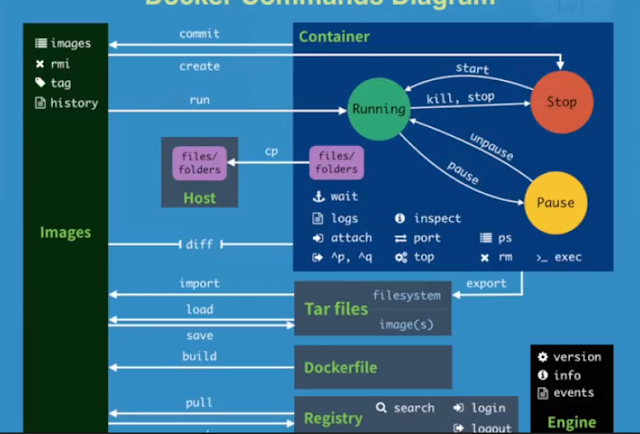
Docker Command

#1 pull images $docker pull chusiang/takaojs1607 #2 list images $docker images #3.1 run docker $docker run -it ### bash #3.2 run do...