顯示具有 Hadoop 標籤的文章。 顯示所有文章

2017年12月29日 星期五

Hadoop Big Data Summary


  1. Ubuntu Server 16.04 LTS (HVM), SSD Volume Type
  2. Java(TM) SE Runtime Environment (build 1.8.0_151-b12)
  3. Hadoop 2.8.2
  4. Pig-0.17.0-src.tar.gz
  5. Hive 

/opt/hadoop-2.8.2/etc/Hadoop/* 
HDFS
├── core-site.xml
├── hadoop-env.sh
├── hdfs-site.xml
MapReduce 程式(Pig, hive代替)
├── mapred-env.sh
├── mapred-site.xml
YARN 分散運算
├── yarn-env.sh
└── yarn-site.xml


MapReduce


2017年12月18日 星期一

Hive 資料倉儲工具

Download and Install
ubuntu@HDClient:~$ wget http://archive.apache.org/dist/hive/hive-0.14.0/apache-hive-0.14.0-bin.tar.gz
ubuntu@HDClient:~$ tar zxf apache-hive-0.14.0-bin.tar.gz -C ~

Edit .bashrc
:::
export PATH=$PATH:/home/ubuntu/apache-hive-0.14.0-bin/bin


ubuntu@HDClient:~$ hive -S
SLF4J: Class path contains multiple SLF4J bindings.
SLF4J: Found binding in [jar:file:/home/ubuntu/hadoop-2.8.2/share/hadoop/common/lib/slf4j-log4j12-1.7.10.jar!/org/slf4j/impl/StaticLoggerBinder.class]
SLF4J: Found binding in [jar:file:/home/ubuntu/apache-hive-0.14.0-bin/lib/hive-jdbc-0.14.0-standalone.jar!/org/slf4j/impl/StaticLoggerBinder.class]
SLF4J: See http://www.slf4j.org/codes.html#multiple_bindings for an explanation.
SLF4J: Actual binding is of type [org.slf4j.impl.Log4jLoggerFactory]

hive> quit ;
ubuntu@HDClient:~$


ubuntu@HDClient:~$ hive -S -e 'set -v' | grep 'fs.defaultFS'
SLF4J: Class path contains multiple SLF4J bindings.
SLF4J: Found binding in [jar:file:/home/ubuntu/hadoop-2.8.2/share/hadoop/common/lib/slf4j-log4j12-1.7.10.jar!/org/slf4j/impl/StaticLoggerBinder.class]
SLF4J: Found binding in [jar:file:/home/ubuntu/apache-hive-0.14.0-bin/lib/hive-jdbc-0.14.0-standalone.jar!/org/slf4j/impl/StaticLoggerBinder.class]
SLF4J: See http://www.slf4j.org/codes.html#multiple_bindings for an explanation.
SLF4J: Actual binding is of type [org.slf4j.impl.Log4jLoggerFactory]
fs.defaultFS=hdfs://nn:8020
mapreduce.job.hdfs-servers=${fs.defaultFS}


ubuntu@HDClient:~$ hive -S
SLF4J: Class path contains multiple SLF4J bindings.
SLF4J: Found binding in [jar:file:/home/ubuntu/hadoop-2.8.2/share/hadoop/common/lib/slf4j-log4j12-1.7.10.jar!/org/slf4j/impl/StaticLoggerBinder.class]
SLF4J: Found binding in [jar:file:/home/ubuntu/apache-hive-0.14.0-bin/lib/hive-jdbc-0.14.0-standalone.jar!/org/slf4j/impl/StaticLoggerBinder.class]
SLF4J: See http://www.slf4j.org/codes.html#multiple_bindings for an explanation.
SLF4J: Actual binding is of type [org.slf4j.impl.Log4jLoggerFactory]
hive> create table dummy (value string) ;
hive> show tables ;
dummy
hive> load data local inpath '/tmp/dummy.txt' into table dummy ;
hive> select * from dummy ;
x
hive> load data local inpath '/tmp/dummy.txt' into table dummy ;
hive> select * from dummy ;
x
x
hive> drop table dummy ;
hive> select * from dummy ;
FAILED: SemanticException [Error 10001]: Line 1:14 Table not found 'dummy'
hive> quit ;


ubuntu@HDClient:~$ hive -S
SLF4J: Class path contains multiple SLF4J bindings.
SLF4J: Found binding in [jar:file:/home/ubuntu/hadoop-2.8.2/share/hadoop/common/lib/slf4j-log4j12-1.7.10.jar!/org/slf4j/impl/StaticLoggerBinder.class]
SLF4J: Found binding in [jar:file:/home/ubuntu/apache-hive-0.14.0-bin/lib/hive-jdbc-0.14.0-standalone.jar!/org/slf4j/impl/StaticLoggerBinder.class]
SLF4J: See http://www.slf4j.org/codes.html#multiple_bindings for an explanation.
SLF4J: Actual binding is of type [org.slf4j.impl.Log4jLoggerFactory]
hive> create table student ( code string, name string, type string, class string, total int) row format delimited fields terminated by '\t' stored as textfile ;
hive> load data local inpath 'student.txt' into table student ;
hive> select code,name,total from student limit 10 ;
大專校院校別學生數              NULL
103 學年度 SY2014-2015          NULL
學校代碼        學校名稱        NULL
0001    國立政治大學    973
0001    國立政治大學    NULL
0002    國立清華大學    NULL


hive> !tree -L 2 metastore_db ; <Hive 儲存schema的地方>
metastore_db
├── dbex.lck
├── db.lck
├── log
│   ├── log1.dat
│   ├── log.ctrl
│   ├── logmirror.ctrl
│   └── README_DO_NOT_TOUCH_FILES.txt
├── README_DO_NOT_TOUCH_FILES.txt
├── seg0
│   ├── c101.dat
│   ├── c10.dat
│   ├── c111.dat
│   ├── c121.dat
│   ├── c130.dat
│   ├── c141.dat
│   ├── c150.dat
│   ├── c161.dat


hive> !hdfs dfs -ls /user/hive/warehouse ; <Hive實際儲存的位置>
SLF4J: Class path contains multiple SLF4J bindings.
SLF4J: Found binding in [jar:file:/home/ubuntu/hadoop-2.8.2/share/hadoop/common/lib/slf4j-log4j12-1.7.10.jar!/org/slf4j/impl/StaticLoggerBinder.class]
SLF4J: Found binding in [jar:file:/home/ubuntu/apache-hive-0.14.0-bin/lib/hive-jdbc-0.14.0-standalone.jar!/org/slf4j/impl/StaticLoggerBinder.class]
SLF4J: See http://www.slf4j.org/codes.html#multiple_bindings for an explanation.
SLF4J: Actual binding is of type [org.slf4j.impl.Log4jLoggerFactory]
Found 1 items
drwxr-xr-x   - ubuntu supergroup          0 2017-12-18 09:55 /user/hive/warehouse/student
 = table name


hive> select * from accounts limit 2 ;
a69dae1f-b2ee-1257-3895-438dfb8ea964    2005-11-30 19:19:03     2005-11-30 19:19:03     1       beth_id 1       Alpha-Murraiin Communications, Inc             Manufacturing    Communications                  5423 Camby Rd.  La Mesa CA     35890    USA                     612-555-4878                            www.alpha-murraiincommunications,inc.com                                        5423 Camby Rd.  La Mesa CA      35890   USA     NULL
e908e57d-18d3-5ffa-f6f4-438dfb104441    2005-11-30 19:19:03     2005-11-30 19:19:03     1       sarah_id        1       N & W Creek Transportation Corp        Distribution     Transportation                  1792 Belmont Rd.        Chula Vista     CA      40520   USA                     555-555-2714                   www.nwcreektransportationcorp.com                                        1792 Belmont Rd.        Chula Vista     CA      40520   USA     NULL


hive> drop table accounts ;
hive> select * from accounts limit 2 ;
FAILED: SemanticException [Error 10001]: Line 1:14 Table not found 'account
《table 刪除了,無法query資料,但Raw Data還在,不允許被異動》
hive> !hdfs dfs -ls /user/hive/myacc ;
SLF4J: Class path contains multiple SLF4J bindings.
SLF4J: Found binding in [jar:file:/home/ubuntu/hadoop-2.8.2/share/hadoop/common/lib/slf4j-log4j12-1.7.10.jar!/org/slf4j/impl/StaticLoggerBinder.class]
SLF4J: Found binding in [jar:file:/home/ubuntu/apache-hive-0.14.0-bin/lib/hive-jdbc-0.14.0-standalone.jar!/org/slf4j/impl/StaticLoggerBinder.class]
SLF4J: See http://www.slf4j.org/codes.html#multiple_bindings for an explanation.
SLF4J: Actual binding is of type [org.slf4j.impl.Log4jLoggerFactory]
Found 1 items
-rw-r--r--   3 ubuntu supergroup     357646 2017-12-18 10:49 /user/hive/myacc/accounts.csv


2017年12月14日 星期四

Pig 實務應用-人力資源調查失業率

ubuntu@HDClient:~$ wget http://www.dgbas.gov.tw/public/data/open/Cen/MP0101A07.xml
ubuntu@HDClient:~$ cat MP0101A07.xml
:::
<項目別_Iterm>2017M10</項目別_Iterm>
<總計_Total>3.75</總計_Total>
<男_Male>3.97</男_Male>
<女_Female>3.47</女_Female>
<age_15-19>8.03</age_15-19>
<age_20-24>12.33</age_20-24>
<age_25-29>6.55</age_25-29>
<age_30-34>3.48</age_30-34>
<age_35-39>3.3</age_35-39>
<age_40-44>2.66</age_40-44>
<age_45-49>2.21</age_45-49>
<age_50-54>2.03</age_50-54>
<age_55-59>1.7</age_55-59>
<age_60-64>1.69</age_60-64>
<age_65_over>0.11</age_65_over>
<國中及以下_Junior_high_and_below>2.86</國中及以下_Junior_high_and_below>
<國小及以下_Primary_school_and_below>2.1</國小及以下_Primary_school_and_below>
<國中_Junior_high>3.26</國中_Junior_high>
<高中_職_Senior_high_and_vocational>3.7</高中_職_Senior_high_and_vocational>
<高中_Senior_high>3.84</高中_Senior_high>
<高職_vocational>3.65</高職_vocational>
<大專及以上_Junior_college_and_above>4.07</大專及以上_Junior_college_and_above>
<專科_Junior_college>2.75</專科_Junior_college>
<大學及以上_University_and_above>4.67</大學及以上_University_and_above>

</失業率>

Install the package for transfer XML files
ubuntu@HDClient:~$ sudo apt-get install xsltproc


ubuntu@HDClient:~$ cat unemployment.xslt
<?xml version="1.0"?>
<xsl:stylesheet version="1.0" xmlns:xsl="http://www.w3.org/1999/XSL/Transform">
 <xsl:output method="text" indent="no"/>

 <xsl:template match="/">
        <xsl:for-each select="//失業率">
         <xsl:value-of select="concat(項目別_Iterm,',',總計_Total,',',男_Male,',',女_Female,',',age_15-19,',',age_20-24,',',age_25-29,',',age_30-34,',',age_35-39,',',age_40-44,',',age_45-49,'&#10;')"/>
        </xsl:for-each>
 </xsl:template>

ubuntu@HDClient:~$ xsltproc unemployment.xslt MP0101A07.xml
:::
2017M08,3.89,4.1,3.63,8.72,13.18,6.71,3.5,3.32,2.77,2.34
2017M09,3.77,3.97,3.51,8.41,12.7,6.57,3.4,3.26,2.71,2.27
2017M10,3.75,3.97,3.47,8.03,12.33,6.55,3.48,3.3,2.66,2.21


ubuntu@HDClient:~$ hdfs dfs -put unemployment.txt unemployment.txt
ubuntu@HDClient:~$ hdfs dfs -ls unem*.txt
-rw-r--r--   3 ubuntu supergroup      30187 2017-12-14 08:21 unemployment.txt
ubuntu@HDClient:~$pig
:::

找出失業率最低的十個月份
grunt> d1 = LOAD 'unemployment.txt' USING PigStorage(',') AS (y:chararray, avg:float) ;
grunt> s1 = ORDER d1 by avg ;
grunt> head10 = LIMIT s1 10 ;
grunt> dump head10 ;

:::
ne.util.MapRedUtil - Total input paths to process : 1
(2017,)
(1981M04,0.86)
(1980M04,0.93)
(1980M01,0.95)
(1981M01,0.96)
(1981M05,1.01)
(1980M03,1.06)
(1979M04,1.09)
(1981M03,1.09)
(1980M02,1.1)

找出失業率最高十個月份
ubuntu@HDClient:~$ cat unemployment10y.pig
d1= LOAD 'unemployment.txt' USING PigStorage(',') AS (y:chararray, avg:float) ;
s1 = ORDER d1 by avg desc ;
head10 = LIMIT s1 10 ;
dump head10 ;
ubuntu@HDClient:~$ pig -f unemployment10y.pig
:::
2017-12-29 09:22:45,591 [main] INFO  org.apache.pig.backend.hadoop.executionengine.util.MapRedUtil - Total input paths to process : 1
(2009M08,6.13)
(2009M07,6.07)
(2009M09,6.04)
(2009M10,5.96)
(2009M06,5.94)
(2009M11,5.86)
(2009,5.85)
(2009M05,5.82)
(2009M03,5.81)
(2010M02,5.76)

2017-12-29 09:22:45,623 [main] INFO  org.apache.pig.Main - Pig script completed in 25 seconds and 139 milliseconds (25139 ms)


找出失業率最高十年
skill- transfer schema y:int + ilter d1 by y is not null 把有月份的過濾掉

ubuntu@HDClient:~$ cat unemployment10y.pig
d1 = LOAD 'unemployment07.txt' USING PigStorage(',') AS (y:int, avg:float) ;
b1 = filter d1 by y is not null ;
s1 = ORDER b1 by avg desc ;
head10 = LIMIT s1 10 ;
dump head10 ;

ubuntu@HDClient:~$ pig unemployment10y.pig
:::
2017-12-29 09:51:45,644 [main] INFO  org.apache.hadoop.mapreduce.lib.input.FileInputFormat - Total input files to process : 1
2017-12-29 09:51:45,644 [main] INFO  org.apache.pig.backend.hadoop.executionengine.util.MapRedUtil - Total input paths to process : 1
(2009,5.85)
(2010,5.21)
(2002,5.17)
(2003,4.99)
(2001,4.57)
(2004,4.44)
(2011,4.39)
(2012,4.24)
(2013,4.18)
(2008,4.14)
2017-12-29 09:51:45,684 [main] INFO  org.apache.pig.Main - Pig script completed in 25 seconds and 368 milliseconds (25368 ms)


2017年12月13日 星期三

Pig 實務應用-大專院校學生人數分析及排序

ubuntu@HDClient:~$ wget --no-check-certificate
https://stats.moe.gov.tw/files/detail/103/103_student.txt


ubuntu@HDClient:~$ cat temp.txt | head
大專校院校別學生數
103 學年度 SY2014-2015
學校代碼        學校名稱        日間∕進修別     等級別  總計    男生計  女生計  一年級男生      一年級女生      二年級男生      二年級女生      三年級男生      三年級女生      四年級男生      四年級女生      五年級男生      五年級女生      六年級男生      六年級女生      七年級男生      七年級女生      延修生男生      延修生女生      縣市名稱        體系別
0001    國立政治大學    D 日    D 博士  973     583     390     117     76      79      62      94      58      98      57       75      53      61      43      59      41      -       -       30 臺北市       1 一般
0001    國立政治大學    D 日    M 碩士  "3,816" "1,750" "2,066" 626     707     573     683     344     404     207     272      -       -       -       -       -       -       -       -       30 臺北市       1 一般
:::


ubuntu@HDClient:~$ sed 's/\"//g' < temp.txt > student.txt 去除雙引號
ubuntu@HDClient:~$ cat student.txt | head
大專校院校別學生數
103 學年度 SY2014-2015
學校代碼        學校名稱        日間∕進修別     等級別  總計    男生計  女生計  一年級男生      一年級女生      二年級男生      二年級女生      三年級男生      三年級女生      四年級男生      四年級女生      五年級男生      五年級女生      六年級男生      六年級女生      七年級男生      七年級女生      延修生男生      延修生女生      縣市名稱        體系別
0001    國立政治大學    D 日    D 博士  973     583     390     117     76      79      62      94      58      98      57       75      53      61      43      59      41      -       -       30 臺北市       1 一般
0001    國立政治大學    D 日    M 碩士  3,816   1,750   2,066   626     707     573     683     344     404     207     272      -       -       -       -       -       -       -       -       30 臺北市       1 一般
0001    國立政治大學    D 日    B 學士  9,639   3,711   5,928   859     1,359   843     1,423   857     1,394   881     1,350    -       -       -       -       -       -       271     402     30 臺北市       1 一般
0001    國立政治大學    N 職    M 碩士  1,625   875     750     314     233     294     257     154     142     67      77       46      41      -       -       -       -       -       -       30 臺北市       1 一般
0002    國立清華大學    D 日    D 博士  1,786   1,403   383     248     58      219     54      213     55      220     56       189     50      152     62      141     46      21      2       18 新竹市       1 一般
:::


ubuntu@HDClient:~$ vi liststudent.pig
record = LOAD '$input' as (code:chararrey, name:chararray, type:chararray, class:chararray, total:int) ;
f1 = filter records by total is not null ;
g1 = group f1 by name ;
dump g1 ;

ubuntu@HDClient:~$ pig -param input=student.txt liststudent.pig
-param 指定Pig執行程序檔使用參數
input 指定檔案名稱=

output:
(世新大學,{(1015,世新大學,P 進,B 學士,60),(1015,世新大學,D 日,D 博士,73),(1015,世新大學,D 日,M 碩士,774),(1015,世新大學,N 職,M 碩士,997),(1015,世新大學,N 修,C 二技,120)})
(中原大學,{(1004,中原大學,D 日,X 4+X,19),(1004,中原大學,D 日,D 博士,366)})
(中華大學,{(1011,中華大學,D 日,M 碩士,664),(1011,中華大學,D 日,D 博士,132),(1011,中華大學,P 進,B 學士,221),(1011,中華大學,N 修,C 二技,176),(1011,中華大學,N 職,M 碩士,283)})
(亞洲大學,{(1048,亞洲大學,D 日,D 博士,164),(1048,亞洲大學,N 職,M 碩士,526),(1048,亞洲大學,D 日,M 碩士,625)})
:::
ubuntu@HDClient:~$ cat countstudent.pig
records = LOAD '$input' as (code:chararray, name:chararray, type:chararray, class:chararray, total:int) ;
f1 = filter records by total is not null ;
g1 = group f1 by name ;
r1 = foreach g1 generate group, SUM(f1.total) ;
dump r1 ;
ubuntu@HDClient:~$ pig -param input=student.txt countstudent.pig

output
:::
(國立高雄海洋科技大學,1291)
(國立高雄第一科技大學,1124)
(崇仁醫護管理專科學校,19)
(慈惠醫護管理專科學校,467)
(新生醫護管理專科學校,86)
(樹人醫護管理專科學校,451)
(耕莘健康管理專科學校,80)
(馬偕醫護管理專科學校,459)
(高美醫護管理專科學校,850)
(康寧醫護暨管理專科學校,416)
2017-12-14 06:59:09,963 [main] INFO  org.apache.pig.Main - Pig script completed in 8 seconds and 433 milliseconds (8433 ms)

++Sorting...
sorted = ORDER r1 by $1 DESC ;
dump sorted ;
ine.util.MapRedUtil - Total input paths to process : 1
(國立臺北商業大學,3024)
(國立屏東大學,2270)
(國立臺北護理健康大學,2208)
(世新大學,2024)
(大漢技術學院,2022)
(國立高雄餐旅大學,2012)
(黎明技術學院,1964)
(國立臺灣科技大學,1933
:::

Pig 實務應用-大專院校名錄分析


Pig 所使用的指令稱為 Pig Latin Statements,執行可以簡單分成三個步驟

1. 使用 LOAD 讀取資料
2. 一連串操作資料的指令
3. 使用 DUMP 來看結果或用 STORE 把結果存起來。如果不執行 DUMP 或 STORE 是不會產生任何 MapReduce job 的

可再細分指令的類型
讀取 : LOAD
儲存 : STORE
資料處理 : FILTER, FOREACH, GROUP, COGROUP, inner JOIN, outer JOIN, UNION, SPLIT, …
彙總運算 : AVG, COUNT, MAX, MIN, SIZE, …
數學運算 : ABS, RANDOM, ROUND, …
字串處理 : INDEXOF, SUBSTRING, REGEX EXTRACT, …
Debug : DUMP, DESCRIBE, EXPLAIN, ILLUSTRATE
HDFS 或本機的檔案操作 : cat, ls, cp, mkdir, copyfromlocal, copyToLocal, ……


ubuntu@HDClient:~$ wget --no-check-certificate https://stats.moe.gov.tw/files/school/105/u1_new.txt
--2017-12-14 02:52:39--  https://stats.moe.gov.tw/files/school/105/u1_new.txt
Resolving stats.moe.gov.tw (stats.moe.gov.tw)... 140.111.34.86
Connecting to stats.moe.gov.tw (stats.moe.gov.tw)|140.111.34.86|:443... connected.
HTTP request sent, awaiting response... 200 OK
Length: 26662 (26K) [text/plain]
Saving to: ‘u1_new.txt’

u1_new.txt          100%[===================>]  26.04K  --.-KB/s    in 0.04s

2017-12-14 02:52:39 (626 KB/s) - ‘u1_new.txt’ saved [26662/26662]


ubuntu@HDClient:~$ sudo apt-get install enca
[sudo] password for ubuntu:
Reading package lists... Done
Building dependency tree
Reading state information... Done
The following additional packages will be installed:
  libenca0 librecode0
Suggested packages:
  cstocs
The following NEW packages will be installed:
  enca libenca0 librecode0
0 upgraded, 3 newly installed, 0 to remove and 0 not upgraded.
Need to get 623 kB of archives.
After this operation, 2,222 kB of additional disk space will be used.
Do you want to continue? [Y/n] Y
Get:1 http://archive.ubuntu.com/ubuntu xenial/universe amd64 libenca0 amd64 1.18-1 [53.8 kB]
Get:2 http://archive.ubuntu.com/ubuntu xenial/main amd64 librecode0 amd64 3.6-22 [523 kB]
Get:3 http://archive.ubuntu.com/ubuntu xenial/universe amd64 enca amd64 1.18-1 [46.2 kB]
Fetched 623 kB in 6s (98.5 kB/s)
Selecting previously unselected package libenca0:amd64.
(Reading database ... 13716 files and directories currently installed.)
Preparing to unpack .../libenca0_1.18-1_amd64.deb ...
Unpacking libenca0:amd64 (1.18-1) ...
Selecting previously unselected package librecode0:amd64.
Preparing to unpack .../librecode0_3.6-22_amd64.deb ...
Unpacking librecode0:amd64 (3.6-22) ...
Selecting previously unselected package enca.
Preparing to unpack .../archives/enca_1.18-1_amd64.deb ...
Unpacking enca (1.18-1) ...
Processing triggers for libc-bin (2.23-0ubuntu9) ...
Setting up libenca0:amd64 (1.18-1) ...
Setting up librecode0:amd64 (3.6-22) ...
Setting up enca (1.18-1) ...
Processing triggers for libc-bin (2.23-0ubuntu9) ...

ubuntu@HDClient:~$enca u1_new.txt
enca: Cannot determine (or understand) your language preferences.
Please use `-L language', or `-L none' if your language is not supported
(only a few multibyte encodings can be recognized then).
Run `enca --list languages' to get a list of supported languages.

ubuntu@HDClient:~$ enca -L bulgarian u1_new.txt
Universal character set 2 bytes; UCS-2; BMP  <編碼格式>
  Mixed line terminators
  Byte order reversed in pairs (1,2 -> 2,1)

ubuntu@HDClient:~$ iconv -f UCS-2 -t utf8 u1_new.txt -o school.txt
ubuntu@HDClient:~$ ls
archive           getjdk.sh     pig-0.17.0             pig_1513154203595.log
authorized_keys   hadoop-2.8.2  pig-0.17.0.tar.gz      school.txt
getjdk_google.sh  jre1.8.0_151  pig_1513149536926.log  u1_new.txt

ubuntu@HDClient:~$ enca -L bulgarian school.txt
Universal transformation format 8 bits; UTF-8  <編碼格式>
  Mixed line terminators

ubuntu@HDClient:~$ cat school.txt | head -n 10
105學年度大專校院名錄

代碼    學校名稱        縣市名稱        地址    電話    網址    體系別
0001    國立政治大學    [38]臺北市      [116]臺北市文山區指南路二段64號 (02)29393091    http://www.nccu.edu.tw  [1]一般
0002    國立清華大學    [18]新竹市      [300]新竹市東區光復路二段101號  (03)5715131     http://www.nthu.edu.tw  [1]一般
0003    國立臺灣大學    [33]臺北市      [106]臺北市大安區羅斯福路四段1號       (02)33663366     http://www.ntu.edu.tw   [1]一般
0004    國立臺灣師範大學        [33]臺北市      [106]臺北市大安區和平東路一段162號      (02)77341111    http://www.ntnu.edu.tw  [3]師範
0005    國立成功大學    [21]臺南市      [701]臺南市東區大學路1號        (06)2757575     http://www.ncku.edu.tw  [1]一般
0006    國立中興大學    [19]臺中市      [402]臺中市南區興大路145號      (04)22873181    http://www.nchu.edu.tw  [1]一般
0007    國立交通大學    [18]新竹市      [300]新竹市東區大學路1001號     (03)5712121     http://www.nctu.edu.tw  [1]一般

grunt> cd test
grunt> copyFromLocal school.txt school.txt
grunt> school = LOAD 'school.txt' AS (sno:int, name:chararray) ;
grunt> dump school;

(,)
(,)
(,學校名稱)
(1,國立政治大學)
(2,國立清華大學)
(3,國立臺灣大學)
(4,國立臺灣師範大學)
:::
(1196,法鼓文理學院)
(1197,台北海洋技術學院)
(221,國立臺南護理專科學校)
(222,國立臺東專科學校)
(1282,馬偕醫護管理專科學校)
(1283,仁德醫護管理專科學校)
(1284,樹人醫護管理專科學校)
(1285,慈惠醫護管理專科學校)
(1286,耕莘健康管理專科學校)
(1287,敏惠醫護管理專科學校)
(1288,高美醫護管理專科學校)
(1289,育英醫護管理專科學校)
(1290,崇仁醫護管理專科學校)
(1291,聖母醫護管理專科學校)
(1292,新生醫護管理專科學校)
(,)
(,) #雜質

grunt> school = LOAD 'school.txt' AS (sno:int, name:chararray, city:chararray) ;
grunt> sdiv = GROUP school BY city ;
grunt> describe sdiv ;
sdiv: {group: chararray,school: {(sno: int,name: chararray,city: chararray)}}
grunt> dump sdiv ;

([2]技職,{(,http://www.chihlee.edu.tw,[2]技職)})
(縣市名稱,{(,學校名稱,縣市名稱)})
([01]新北市,{(1179,德霖技術學院,[01]新北市),(1005,淡江大學,[01]新北市),(1166,亞東技術學院,[01]新北市),(1054,景文科技大學,[01]新北市),(1286,耕莘健康管理專科學校,[01]新北市),(1078,致理科技大學,[01]新北市),(1013,華梵大學,[01]新北市),(1044,聖約翰科技大學,[01]新北市),(1073,醒吾科技大學,[01]新北市),(1021,真理大學,[01]新北市),(17,國立臺北大學,[01]新北市),(1197,台北海洋技術學院,[01]新北市),(1196,法鼓文理學院,[01]新北市),(1195,馬偕醫學院,[01]新北市),(1002,輔仁大學,[01]新北市),(1041,明志科技大學,[01]新北市),(1056,東南科技大學,[01]新北市),(29,國立臺灣藝術大學,[01]新北市),(1076,華夏科技大學,[01]新北市),(1183,黎明技術學院,[01]新北市)})
([02]宜蘭縣,{(1050,佛光大學,[02]宜蘭縣),(31,國立宜蘭大學,[02]宜蘭縣),(1182,蘭陽技術學院,[02]宜蘭縣),(1291,聖母醫護管理專科學校,[02]宜蘭縣)})
([03]桃園市,{(1049,開南大學,[03]桃園市),(8,國立中央大學,[03]桃園市),(1010,元智大學,[03]桃園市),(1009,長庚大學,[03]桃園市),(1004,中原大學,[03]桃園市),(44,國立體育大學,[03]桃園市),(1030,龍華科技大學,[03]桃園市),(1168,南亞技術學院,[03]桃園市),(1036,健行科技大學,[03]桃園市),(1038,萬能科技大學,[03]桃園市),(1070,長庚科技大學,[03]桃園市),(1292,新生醫護管理專科學校,[03]桃園市)})
([04]新竹縣,{(1032,明新科技大學,[04]新竹縣),(1072,大華科技大學,[04]新竹縣)})
([05]苗栗縣,{(1283,仁德醫護管理專科學校,[05]苗栗縣),(1063,育達科技大學,[05]苗栗縣),(1189,亞太創意技術學院,[05]苗栗縣),(32,國立聯合大學,[05]苗栗縣)})
([06]臺中市,{(1034,弘光科技大學,[06]臺中市),(43,國立勤益科技大學,[06]臺中市),(1018,朝陽科技大學,[06]臺中市),(1048,亞洲大學,[06]臺中市),(1008,靜宜大學,[06]臺中市),(1069,修平科技大學,[06]臺中市)})
([07]彰化縣,{(1012,大葉大學,[07]彰化縣),(15,國立彰化師範大學,[07]彰化縣),(1068,中州科技大學,[07]彰化縣),(1058,明道大學,[07]彰化縣),(1040,建國科技大學,[07]彰化縣)})
([08]南投縣,{(21,國立暨南國際大學,[08]南投縣),(1060,南開科技大學,[08]南投縣)})
([09]雲林縣,{(33,國立虎尾科技大學,[09]雲林縣),(23,國立雲林科技大學,[09]雲林縣),(1066,環球科技大學,[09]雲林縣)})
([10]嘉義縣,{(1065,吳鳳科技大學,[10]嘉義縣),(13,國立中正大學,[10]嘉義縣),(1176,稻江科技暨管理學院,[10]嘉義縣),(1020,南華大學,[10]嘉義縣)})
([11]臺南市,{(1051,台南應用科技大學,[11]臺南市),(1055,中華醫事科技大學,[11]臺南市),(35,國立臺南藝術大學,[11]臺南市),(1067,台灣首府大學,[11]臺南市),(1074,南榮科技大學,[11]臺南市),(1033,長榮大學,[11]臺南市),(1052,遠東科技大學,[11]臺南市),(1025,嘉南藥理大學,[11]臺南市),(1024,崑山科技大學,[11]臺南市),(1023,南臺科技大學,[11]臺南市),(1287,敏惠醫護管理專科學校,[11]臺南市)})
([12]高雄市,{(26,國立高雄第一科技大學,[12]高雄市),(1037,正修科技大學,[12]高雄市),(1159,和春技術學院,[12]高雄市),(1184,東方設計學院,[12]高雄市),(1284,樹人醫護管理專科學校,[12]高雄市),(1031,輔英科技大學,[12]高雄市),(1026,樹德科技大學,[12]高雄市),(1288,高美醫護管理專科學校,[12]高雄市),(1042,高苑科技大學,[12]高雄市),(1014,義守大學,[12]高雄市)})
([13]屏東縣,{(24,國立屏東科技大學,[13]屏東縣),(1064,美和科技大學,[13]屏東縣),(1043,大仁科技大學,[13]屏東縣),(52,國立屏東大學,[13]屏東縣),(1285,慈惠醫護管理專科學校,[13]屏東縣)})
([14]臺東縣,{(30,國立臺東大學,[14]臺東縣),(222,國立臺東專科學校,[14]臺東縣)})
([15]花蓮縣,{(20,國立東華大學,[15]花蓮縣),(1027,慈濟大學,[15]花蓮縣),(1077,慈濟科技大學,[15]花蓮縣),(1148,大漢技術學院,[15]花蓮縣),(1192,臺灣觀光學院,[15]花蓮縣)})
([16]澎湖縣,{(42,國立澎湖科技大學,[16]澎湖縣)})
([17]基隆市,{(12,國立臺灣海洋大學,[17]基隆市),(1185,經國管理暨健康學院,[17]基隆市),(1187,崇右技術學院,[17]基隆市)})
([18]新竹市,{(2,國立清華大學,[18]新竹市),(1053,元培醫事科技大學,[18]新竹市),(1039,玄奘大學,[18]新竹市),(1011,中華大學,[18]新竹市),(7,國立交通大學,[18]新竹市)})
([19]臺中市,{(1062,僑光科技大學,[19]臺中市),(1029,中山醫學大學,[19]臺中市),(1047,中臺科技大學,[19]臺中市),(1007,逢甲大學,[19]臺中市),(6,國立中興大學,[19]臺中市),(1001,東海大學,[19]臺中市),(39,國立臺中教育大學,[19]臺中市),(1045,嶺東科技大學,[19]臺中市),(50,國立臺中科技大學,[19]臺中市),(49,國立臺灣體育運動大學,[19]臺中市),(1035,中國醫藥大學,[19]臺中市)})
([20]嘉義市,{(1290,崇仁醫護管理專科學校,[20]嘉義市),(18,國立嘉義大學,[20]嘉義市),(1188,大同技術學院,[20]嘉義市)})
([21]臺南市,{(221,國立臺南護理專科學校,[21]臺南市),(5,國立成功大學,[21]臺南市),(36,國立臺南大學,[21]臺南市),(1125,中信金融管理學院,[21]臺南市)})
([32]臺北市,{(1028,臺北醫學大學,[32]臺北市)})
([33]臺北市,{(37,國立臺北教育大學,[33]臺北市),(22,國立臺灣科技大學,[33]臺北市),(4,國立臺灣師範大學,[33]臺北市),(25,國立臺北科技大學,[33]臺北市),(3,國立臺灣大學,[33]臺北市)})
([34]臺北市,{(1022,大同大學,[34]臺北市),(1017,實踐大學,[34]臺北市)})
([35]臺北市,{(3002,臺北市立大學,[35]臺北市),(51,國立臺北商業大學,[35]臺北市)})
([38]臺北市,{(1015,世新大學,[38]臺北市),(1046,中國科技大學,[38]臺北市),(1,國立政治大學,[38]臺北市)})
([39]臺北市,{(1061,中華科技大學,[39]臺北市)})
([40]臺北市,{(1079,康寧大學,[40]臺北市),(144,國立臺灣戲曲學院,[40]臺北市),(1057,德明財經科技大學,[40]臺北市)})
([41]臺北市,{(1003,東吳大學,[41]臺北市),(1016,銘傳大學,[41]臺北市),(1006,中國文化大學,[41]臺北市)})
([42]臺北市,{(28,國立臺北藝術大學,[42]臺北市),(1071,臺北城市科技大學,[42]臺北市),(46,國立臺北護理健康大學,[42]臺北市),(16,國立陽明大學,[42]臺北市),(1282,馬偕醫護管理專科學校,[42]臺北市)})
([52]高雄市,{(9,國立中山大學,[52]高雄市)})
([54]高雄市,{(19,國立高雄大學,[54]高雄市),(34,國立高雄海洋科技大學,[54]高雄市)})
([55]高雄市,{(27,國立高雄應用科技大學,[55]高雄市),(1289,育英醫護管理專科學校,[55]高雄市),(1019,高雄醫學大學,[55]高雄市),(1075,文藻外語大學,[55]高雄市)})
([58]高雄市,{(14,國立高雄師範大學,[58]高雄市)})
([61]高雄市,{(47,國立高雄餐旅大學,[61]高雄市)})
([71]金門縣,{(48,國立金門大學,[71]金門縣)})
([300]新竹市東區南大路521號,{(,[18]新竹市,[300]新竹市東區南大路521號)})
(,{(,,),(,,),(38,"國立清華大學南大校區,),(,,),(,,)})

<一個市有多個代碼,是分區嗎?>
grunt> counts = foreach sdiv generate group,COUNT(school) ;
grunt> dump counts ;
([2]技職,0)
(縣市名稱,0)
([01]新北市,20)
([02]宜蘭縣,4)
([03]桃園市,12)
([04]新竹縣,2)
([05]苗栗縣,4)
([06]臺中市,6)
([07]彰化縣,5)
([08]南投縣,2)
([09]雲林縣,3)
([10]嘉義縣,4)
([11]臺南市,11)
([12]高雄市,10)
([13]屏東縣,5)
([14]臺東縣,2)
([15]花蓮縣,5)
([16]澎湖縣,1)
([17]基隆市,3)
([18]新竹市,5)
([19]臺中市,11)
([20]嘉義市,3)
([21]臺南市,4)
([32]臺北市,1)
([33]臺北市,5)
([34]臺北市,2)
([35]臺北市,2)
([38]臺北市,3)
([39]臺北市,1)
([40]臺北市,3)
([41]臺北市,3)
([42]臺北市,5)
([52]高雄市,1)
([54]高雄市,2)
([55]高雄市,4)
([58]高雄市,1)
([61]高雄市,1)
([71]金門縣,1)
([300]新竹市東區南大路521號,0)
(,1)

grunt> store counts into 'sr' ;
:::

HadoopVersion   PigVersion      UserId  StartedAt       FinishedAt      Features
2.8.2   0.17.0  ubuntu  2017-12-14 03:22:35     2017-12-14 03:22:41     GROUP_BY

Success!
:::
grunt> ls
:::
hdfs://nn:8020/user/ubuntu/QuasiMonteCarlo_1513151543701_374121214      <dir>
hdfs://nn:8020/user/ubuntu/QuasiMonteCarlo_1513151766235_1024435763     <dir>
hdfs://nn:8020/user/ubuntu/QuasiMonteCarlo_1513152287029_119532194      <dir>
hdfs://nn:8020/user/ubuntu/school.txt<r 3>      20609
hdfs://nn:8020/user/ubuntu/sr   <dir>
grunt> cd sr
hdfs://nn:8020/user/ubuntu/sr/_SUCCESS<r 3>     0
hdfs://nn:8020/user/ubuntu/sr/part-r-00000<r 3> 649

grunt> ls sr
hdfs://nn:8020/user/ubuntu/sr/_SUCCESS<r 3>     0
hdfs://nn:8020/user/ubuntu/sr/part-r-00000<r 3> 649
grunt> cat sr/part-r-00000
[2]技職 0
縣市名稱        0
[01]新北市      20
[02]宜蘭縣      4
[03]桃園市      12
[04]新竹縣      2
[05]苗栗縣      4
:::


2017年12月12日 星期二

Hadoop Client 建置 - Pig 基本使用方法

Prepare Hadoop Client

prereq.

  1. Install Hadoop and JDK package
  2. Configure PATH (JAVA_HOME and HADOOP_HOME)
  3. Edit core-site.xml
  4. Edit /etc/hosts to resolve Hadoop hosts 


unzip JDK and Hadoop to /home/ubuntu directory
Edit .bashrc file
ubuntu@HDClient:~$ echo $PATH
/home/ubuntu/bin:/home/ubuntu/.local/bin:/usr/local/sbin:/usr/local/bin:/usr/sbin:/usr/bin:/sbin:/bin:/usr/games:/usr/local/games:/home/ubuntu/jre1.8.0_151/bin:/home/ubuntu/hadoop-2.8.2/bin:/home/ubuntu/hadoop-2.8.2/sbin

Ensure java -version
Ensure hadoop version

Edit ubuntu@HDClient:~$ sudo more /home/ubuntu/hadoop-2.8.2/etc/hadoop/core-site.xml
:::
<configuration>
        <property>
                <name>fs.defaultFS</name>
                <value>hdfs://nn:8020</value>
        </property>
</configuration>

Hadoop Client Connection Testing
ubuntu@HDClient:~$ hdfs dfsadmin -report
Configured Capacity: 51908788224 (48.34 GB)
Present Capacity: 27684233216 (25.78 GB)
DFS Remaining: 27683569664 (25.78 GB)
DFS Used: 663552 (648 KB)
DFS Used%: 0.00%
Under replicated blocks: 0
Blocks with corrupt replicas: 0
Missing blocks: 0
Missing blocks (with replication factor 1): 0
Pending deletion blocks: 0

-------------------------------------------------
Live datanodes (2):

Name: 172.16.1.210:50010 (dn01)
Hostname: dn01
Decommission Status : Normal
Configured Capacity: 25954394112 (24.17 GB)
DFS Used: 331776 (324 KB)
Non DFS Used: 12095500288 (11.26 GB)
DFS Remaining: 13841784832 (12.89 GB)
DFS Used%: 0.00%
DFS Remaining%: 53.33%
Configured Cache Capacity: 0 (0 B)
Cache Used: 0 (0 B)
Cache Remaining: 0 (0 B)
Cache Used%: 100.00%
Cache Remaining%: 0.00%
Xceivers: 1
Last contact: Tue Dec 12 09:16:45 UTC 2017


Name: 172.16.1.211:50010 (dn02)
Hostname: dn02
Decommission Status : Normal
Configured Capacity: 25954394112 (24.17 GB)
DFS Used: 331776 (324 KB)
Non DFS Used: 12095500288 (11.26 GB)
DFS Remaining: 13841784832 (12.89 GB)
DFS Used%: 0.00%
DFS Remaining%: 53.33%
Configured Cache Capacity: 0 (0 B)
Cache Used: 0 (0 B)
Cache Remaining: 0 (0 B)
Cache Used%: 100.00%
Cache Remaining%: 0.00%
Xceivers: 1
Last contact: Tue Dec 12 09:16:45 UTC 2017

Hadoop Client Connection Testing
ubuntu@HDClient:~$ hdfs dfs -ls /
Found 3 items
drwxr-xr-x   - ubuntu supergroup          0 2017-12-11 03:17 /test
drwx------   - ubuntu supergroup          0 2017-12-11 10:04 /tmp
drwxr-xr-x   - ubuntu supergroup          0 2017-12-11 10:04 /user
ubuntu@HDClient:~$ hdfs dfs -ls /test
Found 3 items
-rw-r--r--   2 ubuntu supergroup      11068 2017-12-11 03:17 /test/.bash_history
-rw-r--r--   2 ubuntu supergroup        220 2017-12-11 03:17 /test/.bash_logout
-rw-r--r--   2 ubuntu supergroup       3986 2017-12-11 03:17 /test/.bashrc

Launch Pig interactive mode
ubuntu@HDClient:~$ pig
17/12/13 08:27:38 INFO pig.ExecTypeProvider: Trying ExecType : LOCAL
17/12/13 08:27:38 INFO pig.ExecTypeProvider: Trying ExecType : MAPREDUCE
17/12/13 08:27:38 INFO pig.ExecTypeProvider: Picked MAPREDUCE as the ExecType
2017-12-13 08:27:38,086 [main] INFO  org.apache.pig.Main - Apache Pig version 0.17.0 (r1797386) compiled Jun 02 2017, 15:41:58
2017-12-13 08:27:38,086 [main] INFO  org.apache.pig.Main - Logging error messages to: /home/ubuntu/pig_1513153658083.log
2017-12-13 08:27:38,113 [main] INFO  org.apache.pig.impl.util.Utils - Default bootup file /home/ubuntu/.pigbootup not found
2017-12-13 08:27:38,778 [main] INFO  org.apache.hadoop.conf.Configuration.deprecation - mapred.job.tracker is deprecated. Instead, use mapreduce.jobtracker.address
2017-12-13 08:27:38,778 [main] INFO  org.apache.pig.backend.hadoop.executionengine.HExecutionEngine - Connecting to hadoop file system at: hdfs://nn:8020
2017-12-13 08:27:39,416 [main] INFO  org.apache.pig.PigServer - Pig Script ID for the session: PIG-default-b248c438-3f49-47e0-9760-7dc347d818b2
2017-12-13 08:27:39,416 [main] WARN  org.apache.pig.PigServer - ATS is disabled since yarn.timeline-service.enabled set to false

###sudo cat /opt/hadoop-2.8.2/etc/hadoop/yarn-site.xml
<property>
  <description>Indicate to clients whether Timeline service is enabled or not.
  If enabled, the TimelineClient library used by end-users will post entities
  and events to the Timeline server.</description>
  <name>yarn.timeline-service.enabled</name>
  <value>true</value>
</property>

grunt> pwd
hdfs://nn:8020/user/ubuntu

grunt> sh ls -al
::
total 225304
drwxr-xr-x  9 ubuntu ubuntu      4096 Dec 13 07:19 .
drwxr-xr-x  3 root   root        4096 Dec  5 10:29 ..
drwxrwxr-x  2 ubuntu ubuntu      4096 Dec  6 08:20 archive
-rw-rw-r--  1 ubuntu ubuntu      1202 Dec  7 10:36 authorized_keys
-rw-------  1 ubuntu ubuntu     12878 Dec 13 07:20 .bash_history
-rw-r--r--  1 ubuntu ubuntu       220 Aug 31  2015 .bash_logout
-rw-r--r--  1 ubuntu ubuntu      4049 Dec 13 07:18 .bashrc
:::

grunt> cd hdfs:///
grunt> ls
hdfs://nn:8020/test     <dir>
hdfs://nn:8020/tmp      <dir>
hdfs://nn:8020/user     <dir>

grunt> cd test
grunt> copyFromLocal /etc/passwd .

grunt> takeInfo = LOAD 'passwd' USING PigStorage(':') AS (user:chararray, passwd:chararray, uid:int, gid:int, userinfo:chararray, home:chararray, shell:chararray) ;

grunt> dump takeInfo ;

2017-12-13 08:57:08,456 [main] INFO  org.apache.pig.tools.pigstats.ScriptState - Pig features used in the script: UNKNOWN
2017-12-13 08:57:08,472 [main] WARN  org.apache.pig.data.SchemaTupleBackend - SchemaTupleBackend has already been initialized
2017-12-13 08:57:08,472 [main] INFO  org.apache.pig.newplan.logical.optimizer.LogicalPlanOptimizer - {RULES_ENABLED=[AddForEach, ColumnMapKeyPrune, ConstantCalculator, GroupByConstParallelSetter, LimitOptimizer, LoadTypeCastInserter, MergeFilter, MergeForEach, NestedLimitOptimizer, PartitionFilterOptimizer, PredicatePushdownOptimizer, PushDownForEachFlatten, PushUpFilter, SplitFilter, StreamTypeCastInserter]}
2017-12-13 08:57:08,474 [main] INFO  org.apache.pig.backend.hadoop.executionengine.mapReduceLayer.MRCompiler - File concatenation threshold: 100 optimistic? false
2017-12-13 08:57:08,475 [main] INFO  org.apache.pig.backend.hadoop.executionengine.mapReduceLayer.MultiQueryOptimizer - MR plan size before optimization: 1
2017-12-13 08:57:08,475 [main] INFO  org.apache.pig.backend.hadoop.executionengine.mapReduceLayer.MultiQueryOptimizer - MR plan size after optimization: 1
2017-12-13 08:57:08,486 [main] INFO  org.apache.hadoop.metrics.jvm.JvmMetrics - Cannot initialize JVM Metrics with processName=JobTracker, sessionId= - already initialized
2017-12-13 08:57:08,487 [main] INFO  org.apache.pig.tools.pigstats.mapreduce.MRScriptState - Pig script settings are added to the job
2017-12-13 08:57:08,487 [main] INFO  org.apache.pig.backend.hadoop.executionengine.mapReduceLayer.JobControlCompiler - mapred.job.reduce.markreset.buffer.percent is not set, set to default 0.3
2017-12-13 08:57:08,487 [main] INFO  org.apache.pig.backend.hadoop.executionengine.mapReduceLayer.JobControlCompiler - This job cannot be converted run in-process
2017-12-13 08:57:08,569 [main] INFO  org.apache.pig.backend.hadoop.executionengine.mapReduceLayer.JobControlCompiler - Added jar file:/home/ubuntu/pig-0.17.0/pig-0.17.0-core-h2.jar to DistributedCache through /tmp/temp-942992935/tmp216607249/pig-0.17.0-core-h2.jar
2017-12-13 08:57:08,597 [main] INFO  org.apache.pig.backend.hadoop.executionengine.mapReduceLayer.JobControlCompiler - Added jar file:/home/ubuntu/pig-0.17.0/lib/automaton-1.11-8.jar to DistributedCache through /tmp/temp-942992935/tmp-815792358/automaton-1.11-8.jar
2017-12-13 08:57:08,625 [main] INFO  org.apache.pig.backend.hadoop.executionengine.mapReduceLayer.JobControlCompiler - Added jar file:/home/ubuntu/pig-0.17.0/lib/antlr-runtime-3.4.jar to DistributedCache through /tmp/temp-942992935/tmp-1770634992/antlr-runtime-3.4.jar
2017-12-13 08:57:08,666 [main] INFO  org.apache.pig.backend.hadoop.executionengine.mapReduceLayer.JobControlCompiler - Added jar file:/home/ubuntu/pig-0.17.0/lib/joda-time-2.9.3.jar to DistributedCache through /tmp/temp-942992935/tmp1684442717/joda-time-2.9.3.jar
2017-12-13 08:57:08,667 [main] INFO  org.apache.pig.backend.hadoop.executionengine.mapReduceLayer.JobControlCompiler - Setting up single store job
2017-12-13 08:57:08,668 [main] INFO  org.apache.pig.data.SchemaTupleFrontend - Key [pig.schematuple] is false, will not generate code.
2017-12-13 08:57:08,669 [main] INFO  org.apache.pig.data.SchemaTupleFrontend - Starting process to move generated code to distributed cacche
2017-12-13 08:57:08,669 [main] INFO  org.apache.pig.data.SchemaTupleFrontend - Setting key [pig.schematuple.classes] with classes to deserialize []
2017-12-13 08:57:08,685 [main] INFO  org.apache.pig.backend.hadoop.executionengine.mapReduceLayer.MapReduceLauncher - 1 map-reduce job(s) waiting for submission.
2017-12-13 08:57:08,687 [JobControl] INFO  org.apache.hadoop.metrics.jvm.JvmMetrics - Cannot initialize JVM Metrics with processName=JobTracker, sessionId= - already initialized
2017-12-13 08:57:08,706 [JobControl] WARN  org.apache.hadoop.mapreduce.JobResourceUploader - No job jar file set.  User classes may not be found. See Job or Job#setJar(String).
2017-12-13 08:57:08,727 [JobControl] INFO  org.apache.pig.builtin.PigStorage - Using PigTextInputFormat
2017-12-13 08:57:08,729 [JobControl] INFO  org.apache.hadoop.mapreduce.lib.input.FileInputFormat - Total input files to process : 1
2017-12-13 08:57:08,729 [JobControl] INFO  org.apache.pig.backend.hadoop.executionengine.util.MapRedUtil - Total input paths to process : 1
2017-12-13 08:57:08,730 [JobControl] INFO  org.apache.pig.backend.hadoop.executionengine.util.MapRedUtil - Total input paths (combined) to process : 1
2017-12-13 08:57:08,732 [JobControl] INFO  org.apache.hadoop.mapreduce.JobSubmitter - number of splits:1
2017-12-13 08:57:08,744 [JobControl] INFO  org.apache.hadoop.mapreduce.JobSubmitter - Submitting tokens for job: job_local925571862_0002
2017-12-13 08:57:08,870 [JobControl] INFO  org.apache.hadoop.mapred.LocalDistributedCacheManager - Creating symlink: /tmp/hadoop-ubuntu/mapred/local/1513155428781/pig-0.17.0-core-h2.jar <- /home/ubuntu/pig-0.17.0-core-h2.jar
2017-12-13 08:57:08,886 [JobControl] INFO  org.apache.hadoop.mapred.LocalDistributedCacheManager - Localized hdfs://nn:8020/tmp/temp-942992935/tmp216607249/pig-0.17.0-core-h2.jar as file:/tmp/hadoop-ubuntu/mapred/local/1513155428781/pig-0.17.0-core-h2.jar
2017-12-13 08:57:08,894 [JobControl] INFO  org.apache.hadoop.mapred.LocalDistributedCacheManager - Creating symlink: /tmp/hadoop-ubuntu/mapred/local/1513155428782/automaton-1.11-8.jar <- /home/ubuntu/automaton-1.11-8.jar
2017-12-13 08:57:08,907 [JobControl] INFO  org.apache.hadoop.mapred.LocalDistributedCacheManager - Localized hdfs://nn:8020/tmp/temp-942992935/tmp-815792358/automaton-1.11-8.jar as file:/tmp/hadoop-ubuntu/mapred/local/1513155428782/automaton-1.11-8.jar
2017-12-13 08:57:08,907 [JobControl] INFO  org.apache.hadoop.mapred.LocalDistributedCacheManager - Creating symlink: /tmp/hadoop-ubuntu/mapred/local/1513155428783/antlr-runtime-3.4.jar <- /home/ubuntu/antlr-runtime-3.4.jar
2017-12-13 08:57:08,910 [JobControl] INFO  org.apache.hadoop.mapred.LocalDistributedCacheManager - Localized hdfs://nn:8020/tmp/temp-942992935/tmp-1770634992/antlr-runtime-3.4.jar as file:/tmp/hadoop-ubuntu/mapred/local/1513155428783/antlr-runtime-3.4.jar
2017-12-13 08:57:08,910 [JobControl] INFO  org.apache.hadoop.mapred.LocalDistributedCacheManager - Creating symlink: /tmp/hadoop-ubuntu/mapred/local/1513155428784/joda-time-2.9.3.jar <- /home/ubuntu/joda-time-2.9.3.jar
2017-12-13 08:57:08,911 [JobControl] INFO  org.apache.hadoop.mapred.LocalDistributedCacheManager - Localized hdfs://nn:8020/tmp/temp-942992935/tmp1684442717/joda-time-2.9.3.jar as file:/tmp/hadoop-ubuntu/mapred/local/1513155428784/joda-time-2.9.3.jar
2017-12-13 08:57:08,952 [JobControl] INFO  org.apache.hadoop.mapred.LocalDistributedCacheManager - file:/tmp/hadoop-ubuntu/mapred/local/1513155428781/pig-0.17.0-core-h2.jar
2017-12-13 08:57:08,953 [JobControl] INFO  org.apache.hadoop.mapred.LocalDistributedCacheManager - file:/tmp/hadoop-ubuntu/mapred/local/1513155428782/automaton-1.11-8.jar
2017-12-13 08:57:08,953 [JobControl] INFO  org.apache.hadoop.mapred.LocalDistributedCacheManager - file:/tmp/hadoop-ubuntu/mapred/local/1513155428783/antlr-runtime-3.4.jar
2017-12-13 08:57:08,953 [JobControl] INFO  org.apache.hadoop.mapred.LocalDistributedCacheManager - file:/tmp/hadoop-ubuntu/mapred/local/1513155428784/joda-time-2.9.3.jar
2017-12-13 08:57:08,953 [JobControl] INFO  org.apache.hadoop.mapreduce.Job - The url to track the job: http://localhost:8080/
2017-12-13 08:57:08,958 [Thread-63] INFO  org.apache.hadoop.mapred.LocalJobRunner - OutputCommitter set in config null
2017-12-13 08:57:08,966 [Thread-63] INFO  org.apache.hadoop.conf.Configuration.deprecation - mapred.job.reduce.markreset.buffer.percent is deprecated. Instead, use mapreduce.reduce.markreset.buffer.percent
2017-12-13 08:57:08,967 [Thread-63] INFO  org.apache.hadoop.mapreduce.lib.output.FileOutputCommitter - File Output Committer Algorithm version is 1
2017-12-13 08:57:08,967 [Thread-63] INFO  org.apache.hadoop.mapreduce.lib.output.FileOutputCommitter - FileOutputCommitter skip cleanup _temporary folders under output directory:false, ignore cleanup failures: false
2017-12-13 08:57:08,967 [Thread-63] INFO  org.apache.hadoop.mapred.LocalJobRunner - OutputCommitter is org.apache.pig.backend.hadoop.executionengine.mapReduceLayer.PigOutputCommitter
2017-12-13 08:57:08,971 [Thread-63] INFO  org.apache.hadoop.mapred.LocalJobRunner - Waiting for map tasks
2017-12-13 08:57:08,972 [LocalJobRunner Map Task Executor #0] INFO  org.apache.hadoop.mapred.LocalJobRunner - Starting task: attempt_local925571862_0002_m_000000_0
2017-12-13 08:57:08,985 [LocalJobRunner Map Task Executor #0] INFO  org.apache.hadoop.mapreduce.lib.output.FileOutputCommitter - File Output Committer Algorithm version is 1
2017-12-13 08:57:08,986 [LocalJobRunner Map Task Executor #0] INFO  org.apache.hadoop.mapreduce.lib.output.FileOutputCommitter - FileOutputCommitter skip cleanup _temporary folders under output directory:false, ignore cleanup failures: false
2017-12-13 08:57:08,988 [LocalJobRunner Map Task Executor #0] INFO  org.apache.hadoop.mapred.Task -  Using ResourceCalculatorProcessTree : [ ]
2017-12-13 08:57:08,991 [LocalJobRunner Map Task Executor #0] INFO  org.apache.hadoop.mapred.MapTask - Processing split: Number of splits :1
Total Length = 1374
Input split[0]:
   Length = 1374
   ClassName: org.apache.hadoop.mapreduce.lib.input.FileSplit
   Locations:

-----------------------

2017-12-13 08:57:08,998 [LocalJobRunner Map Task Executor #0] INFO  org.apache.pig.builtin.PigStorage - Using PigTextInputFormat
2017-12-13 08:57:08,998 [LocalJobRunner Map Task Executor #0] INFO  org.apache.pig.backend.hadoop.executionengine.mapReduceLayer.PigRecordReader - Current split being processed hdfs://nn:8020/test/passwd:0+1374
2017-12-13 08:57:09,004 [LocalJobRunner Map Task Executor #0] INFO  org.apache.hadoop.mapreduce.lib.output.FileOutputCommitter - File Output Committer Algorithm version is 1
2017-12-13 08:57:09,004 [LocalJobRunner Map Task Executor #0] INFO  org.apache.hadoop.mapreduce.lib.output.FileOutputCommitter - FileOutputCommitter skip cleanup _temporary folders under output directory:false, ignore cleanup failures: false
2017-12-13 08:57:09,015 [LocalJobRunner Map Task Executor #0] INFO  org.apache.pig.impl.util.SpillableMemoryManager - Selected heap (PS Old Gen) of size 699400192 to monitor. collectionUsageThreshold = 489580128, usageThreshold = 489580128
2017-12-13 08:57:09,016 [LocalJobRunner Map Task Executor #0] INFO  org.apache.pig.data.SchemaTupleBackend - Key [pig.schematuple] was not set... will not generate code.
2017-12-13 08:57:09,024 [LocalJobRunner Map Task Executor #0] INFO  org.apache.pig.backend.hadoop.executionengine.mapReduceLayer.PigMapOnly$Map - Aliases being processed per job phase (AliasName[line,offset]): M: takeInfo[1,11],takeInfo[-1,-1] C:  R:
2017-12-13 08:57:09,034 [LocalJobRunner Map Task Executor #0] INFO  org.apache.hadoop.mapred.LocalJobRunner -
2017-12-13 08:57:09,070 [LocalJobRunner Map Task Executor #0] INFO  org.apache.hadoop.mapred.Task - Task:attempt_local925571862_0002_m_000000_0 is done. And is in the process of committing
2017-12-13 08:57:09,074 [LocalJobRunner Map Task Executor #0] INFO  org.apache.hadoop.mapred.LocalJobRunner -
2017-12-13 08:57:09,076 [LocalJobRunner Map Task Executor #0] INFO  org.apache.hadoop.mapred.Task - Task attempt_local925571862_0002_m_000000_0 is allowed to commit now
2017-12-13 08:57:09,084 [LocalJobRunner Map Task Executor #0] INFO  org.apache.hadoop.mapreduce.lib.output.FileOutputCommitter - Saved output of task 'attempt_local925571862_0002_m_000000_0' to hdfs://nn:8020/tmp/temp-942992935/tmp326033959/_temporary/0/task_local925571862_0002_m_000000
2017-12-13 08:57:09,085 [LocalJobRunner Map Task Executor #0] INFO  org.apache.hadoop.mapred.LocalJobRunner - map
2017-12-13 08:57:09,085 [LocalJobRunner Map Task Executor #0] INFO  org.apache.hadoop.mapred.Task - Task 'attempt_local925571862_0002_m_000000_0' done.
2017-12-13 08:57:09,085 [LocalJobRunner Map Task Executor #0] INFO  org.apache.hadoop.mapred.LocalJobRunner - Finishing task: attempt_local925571862_0002_m_000000_0
2017-12-13 08:57:09,085 [Thread-63] INFO  org.apache.hadoop.mapred.LocalJobRunner - map task executor complete.
2017-12-13 08:57:09,186 [main] INFO  org.apache.pig.backend.hadoop.executionengine.mapReduceLayer.MapReduceLauncher - HadoopJobId: job_local925571862_0002
2017-12-13 08:57:09,186 [main] INFO  org.apache.pig.backend.hadoop.executionengine.mapReduceLayer.MapReduceLauncher - Processing aliases takeInfo
2017-12-13 08:57:09,186 [main] INFO  org.apache.pig.backend.hadoop.executionengine.mapReduceLayer.MapReduceLauncher - detailed locations: M: takeInfo[1,11],takeInfo[-1,-1] C:  R:
2017-12-13 08:57:09,188 [main] INFO  org.apache.pig.backend.hadoop.executionengine.mapReduceLayer.MapReduceLauncher - 50% complete
2017-12-13 08:57:09,188 [main] INFO  org.apache.pig.backend.hadoop.executionengine.mapReduceLayer.MapReduceLauncher - Running jobs are [job_local925571862_0002]
2017-12-13 08:57:14,194 [main] INFO  org.apache.hadoop.metrics.jvm.JvmMetrics - Cannot initialize JVM Metrics with processName=JobTracker, sessionId= - already initialized
2017-12-13 08:57:14,195 [main] INFO  org.apache.hadoop.metrics.jvm.JvmMetrics - Cannot initialize JVM Metrics with processName=JobTracker, sessionId= - already initialized
2017-12-13 08:57:14,196 [main] INFO  org.apache.hadoop.metrics.jvm.JvmMetrics - Cannot initialize JVM Metrics with processName=JobTracker, sessionId= - already initialized
2017-12-13 08:57:14,199 [main] INFO  org.apache.pig.backend.hadoop.executionengine.mapReduceLayer.MapReduceLauncher - 100% complete
2017-12-13 08:57:14,200 [main] INFO  org.apache.pig.tools.pigstats.mapreduce.SimplePigStats - Script Statistics:

HadoopVersion   PigVersion      UserId  StartedAt                         FinishedAt                    Features
2.8.2                    0.17.0              ubuntu  2017-12-13 08:57:08     2017-12-13 08:57:14    UNKNOWN

Success!

Job Stats (time in seconds):
JobId   Maps    Reduces MaxMapTime      MinMapTime      AvgMapTime      MedianMapTime   MaxReduceTime   MinReduceTime   AvgReduceTime   MedianReducetime       Alias    Feature Outputs
job_local925571862_0002 1       0       n/a     n/a     n/a     n/a     0      00       0       takeInfo        MAP_ONLY        hdfs://nn:8020/tmp/temp-942992935/tmp326033959,

Input(s):
Successfully read 26 records (11515989 bytes) from: "hdfs://nn:8020/test/passwd"

Output(s):
Successfully stored 26 records (11516292 bytes) in: "hdfs://nn:8020/tmp/temp-942992935/tmp326033959"

Counters:
Total records written : 26
Total bytes written : 11516292
Spillable Memory Manager spill count : 0
Total bags proactively spilled: 0
Total records proactively spilled: 0

Job DAG:
job_local925571862_0002


2017-12-13 08:57:14,201 [main] INFO  org.apache.hadoop.metrics.jvm.JvmMetrics - Cannot initialize JVM Metrics with processName=JobTracker, sessionId= - already initialized
2017-12-13 08:57:14,202 [main] INFO  org.apache.hadoop.metrics.jvm.JvmMetrics - Cannot initialize JVM Metrics with processName=JobTracker, sessionId= - already initialized
2017-12-13 08:57:14,206 [main] INFO  org.apache.pig.backend.hadoop.executionengine.mapReduceLayer.MapReduceLauncher - Success!
2017-12-13 08:57:14,207 [main] WARN  org.apache.pig.data.SchemaTupleBackend - SchemaTupleBackend has already been initialized
2017-12-13 08:57:14,210 [main] INFO  org.apache.hadoop.mapreduce.lib.input.FileInputFormat - Total input files to process : 1
2017-12-13 08:57:14,210 [main] INFO  org.apache.pig.backend.hadoop.executionengine.util.MapRedUtil - Total input paths to process : 1
(root,x,0,0,root,/root,/bin/bash)
(daemon,x,1,1,daemon,/usr/sbin,/usr/sbin/nologin)
(bin,x,2,2,bin,/bin,/usr/sbin/nologin)
:::
(ubuntu,x,1000,1000,,/home/ubuntu,/bin/bash)

grunt> group_shell = GROUP takeInfo BY shell ;
grunt> dump group_shell ;
:::
ne.util.MapRedUtil - Total input paths to process : 1
(/bin/bash,{(root,x,0,0,root,/root,/bin/bash),(ubuntu,x,1000,1000,,/home/ubuntu,/bin/bash)})
(/bin/sync,{(sync,x,4,65534,sync,/bin,/bin/sync)})
(/bin/false,{(systemd-resolve,x,102,104,systemd Resolver,,,,/run/systemd/resolve,/bin/false),(systemd-network,x,101,103,systemd Network Management,,,,/run/systemd/netif,/bin/false),(systemd-timesync,x,100,102,systemd Time Synchronization,,,,/run/systemd,/bin/false),(syslog,x,104,108,,/home/syslog,/bin/false),(_apt,x,105,65534,,/nonexistent,/bin/false),(systemd-bus-proxy,x,103,105,systemd Bus Proxy,,,,/run/systemd,/bin/false)})
(/usr/sbin/nologin,{(proxy,x,13,13,proxy,/bin,/usr/sbin/nologin),(nobody,x,65534,65534,nobody,/nonexistent,/usr/sbin/nologin),(gnats,x,41,41,Gnats Bug-Reporting System (admin),/var/lib/gnats,/usr/sbin/nologin),(irc,x,39,39,ircd,/var/run/ircd,/usr/sbin/nologin),(list,x,38,38,Mailing List Manager,/var/list,/usr/sbin/nologin),(backup,x,34,34,backup,/var/backups,/usr/sbin/nologin),(www-data,x,33,33,www-data,/var/www,/usr/sbin/nologin),(uucp,x,10,10,uucp,/var/spool/uucp,/usr/sbin/nologin),(news,x,9,9,news,/var/spool/news,/usr/sbin/nologin),(mail,x,8,8,mail,/var/mail,/usr/sbin/nologin),(lp,x,7,7,lp,/var/spool/lpd,/usr/sbin/nologin),(man,x,6,12,man,/var/cache/man,/usr/sbin/nologin),(games,x,5,60,games,/usr/games,/usr/sbin/nologin),(sys,x,3,3,sys,/dev,/usr/sbin/nologin),(bin,x,2,2,bin,/bin,/usr/sbin/nologin),(daemon,x,1,1,daemon,/usr/sbin,/usr/sbin/nologin),(sshd,x,106,65534,,/var/run/sshd,/usr/sbin/nologin)})
:::

grunt> count = foreach group_shell generate group,COUNT(takeInfo) ;
grunt> dump count  ;
:::
2017-12-13 09:06:04,223 [main] INFO  org.apache.pig.backend.hadoop.executionengine.util.MapRedUtil - Total input paths to process : 1
(/bin/bash,2)
(/bin/sync,1)
(/bin/false,6)
(/usr/sbin/nologin,17)


2017年12月11日 星期一

YARN Management


Check YARN System Status
ubuntu@rm:~$ yarn node -list -all
17/12/12 04:11:12 INFO client.RMProxy: Connecting to ResourceManager at rm/172.16.1.201:8032
17/12/12 04:11:13 INFO client.AHSProxy: Connecting to Application History server at rm/172.16.1.201:10200
Total Nodes:2
         Node-Id             Node-State Node-Http-Address       Number-of-Running-Containers
      dn01:38205                RUNNING         dn01:8042                                  0
      dn02:46760                RUNNING         dn02:8042                                  0

Check Node Status
ubuntu@rm:~$ yarn node -status dn01:38205
17/12/12 04:12:10 INFO client.RMProxy: Connecting to ResourceManager at rm/172.16.1.201:8032
17/12/12 04:12:10 INFO client.AHSProxy: Connecting to Application History server at rm/172.16.1.201:10200
Node Report :
        Node-Id : dn01:38205
        Rack : /default-rack
        Node-State : RUNNING
        Node-Http-Address : dn01:8042
        Last-Health-Update : Tue 12/Dec/17 04:11:01:347UTC
        Health-Report :
        Containers : 0
        Memory-Used : 0MB
        Memory-Capacity : 8192MB
        CPU-Used : 0 vcores
        CPU-Capacity : 8 vcores
        Node-Labels :
        Resource Utilization by Node : PMem:469 MB, VMem:469 MB, VCores:0.61646116
        Resource Utilization by Containers : PMem:0 MB, VMem:0 MB, VCores:0.0

Adjust resource configuration per real physical resource

ubuntu@rm:~$ sudo vi /opt/hadoop-2.8.2/etc/hadoop/yarn-site.xml

Added
:::
        <property>
                <name>yarn.nodemanager.resource.memory-mb</name>
                <value>1024</value>
        </property>
        <property>
                <name>yarn.nodemanager.resource.cpu-vcores</name>
                <value>2</value>
        </property>
Eof


2017年12月10日 星期日

HDFS Commands

ubuntu@nn:~$ . /opt/hadoop-2.8.2/sbin/start-dfs.sh
Illegal option -b
-bash: cd: Usage: /usr/bin: No such file or directory?
Starting namenodes on [nn]
nn: starting namenode, logging to /tmp/hadoop-ubuntu-namenode-nn.out
dn02: starting datanode, logging to /tmp/hadoop-ubuntu-datanode-dn02.out
dn01: starting datanode, logging to /tmp/hadoop-ubuntu-datanode-dn01.out
Starting secondary namenodes [0.0.0.0]
0.0.0.0: starting secondarynamenode, logging to /tmp/hadoop-ubuntu-secondarynamenode-nn.out

List
ubuntu@nn:~$ hdfs dfs -ls /

Create Folder
ubuntu@nn:~$ hdfs dfs -mkdir /Big 建立hdfs目錄
ubuntu@nn:~$ hdfs dfs -ls /
Found 1 items
drwxr-xr-x   - ubuntu supergroup          0 2017-12-08 10:34 /Big

Copy file from local
ubuntu@nn:~$ hdfs dfs -copyFromLocal .bash* 

List
ubuntu@nn:~$ hdfs dfs -ls /Big
Found 3 items
-rw-r--r--   2 ubuntu supergroup      10427 2017-12-08 10:37 /Big/.bash_history
-rw-r--r--   2 ubuntu supergroup        220 2017-12-08 10:37 /Big/.bash_logout
-rw-r--r--   2 ubuntu supergroup       3986 2017-12-08 10:37 /Big/.bashrc

ubuntu@nn:~$ hdfs dfsadmin -printTopology 檢查datanode
Rack: /default-rack
   172.16.1.210:50010 (dn01)
   172.16.1.211:50010 (dn02)

檢視 HDFS 根目錄權限設定
ubuntu@nn:~$ hdfs dfs -getfacl /
# file: /
# owner: ubuntu
# group: supergroup
user::rwx
group::r-x
other::r-x

顯示檔案內容
ubuntu@nn:~$ hdfs dfs -cat /Big/.bashrc | head -n 5
# ~/.bashrc: executed by bash(1) for non-login shells.
# see /usr/share/doc/bash/examples/startup-files (in the package bash-doc)
# for examples

# If not running interactively, don't do anything


取回檔案, copy file from hdfs to local file system
ubuntu@nn:~$ hdfs dfs -get /Big/.bashrc /tmp/test.txt

Delet file
ubuntu@nn:~$ hdfs dfs -rm /Big/.bashrc
Deleted /Big/.bashrc


Delete directory
ubuntu@nn:~$ hdfs dfs -rm -r /Big
Deleted /Big


ubuntu@nn:~$ hdfs dfsadmin -report
Configured Capacity: 51908788224 (48.34 GB)
Present Capacity: 31196621972 (29.05 GB)
DFS Remaining: 31196504064 (29.05 GB)
DFS Used: 117908 (115.14 KB)
DFS Used%: 0.00%
Under replicated blocks: 0
Blocks with corrupt replicas: 0
Missing blocks: 0
Missing blocks (with replication factor 1): 0
Pending deletion blocks: 0

-------------------------------------------------
Live datanodes (2):

Name: 172.16.1.210:50010 (dn01)
Hostname: dn01
Decommission Status : Normal
Configured Capacity: 25954394112 (24.17 GB)
DFS Used: 58954 (57.57 KB)
Non DFS Used: 10339305910 (9.63 GB)
DFS Remaining: 15598252032 (14.53 GB)
DFS Used%: 0.00%
DFS Remaining%: 60.10%
Configured Cache Capacity: 0 (0 B)
Cache Used: 0 (0 B)
Cache Remaining: 0 (0 B)
Cache Used%: 100.00%
Cache Remaining%: 0.00%
Xceivers: 1
Last contact: Mon Dec 11 03:15:08 UTC 2017


Name: 172.16.1.211:50010 (dn02)
Hostname: dn02
Decommission Status : Normal
Configured Capacity: 25954394112 (24.17 GB)
DFS Used: 58954 (57.57 KB)
Non DFS Used: 10339305910 (9.63 GB)
DFS Remaining: 15598252032 (14.53 GB)
DFS Used%: 0.00%
DFS Remaining%: 60.10%
Configured Cache Capacity: 0 (0 B)
Cache Used: 0 (0 B)
Cache Remaining: 0 (0 B)
Cache Used%: 100.00%
Cache Remaining%: 0.00%
Xceivers: 1
Last contact: Mon Dec 11 03:15:07 UTC 2017

檢查HDFS 檔案儲存資訊
ubuntu@nn:~$ hdfs fsck /test/.bashrc -files -blocks -locations
Connecting to namenode via http://nn:50070/fsck?ugi=ubuntu&files=1&blocks=1&locations=1&path=%2Ftest%2F.bashrc
FSCK started by ubuntu (auth:SIMPLE) from /172.16.1.200 for path /test/.bashrc at Mon Dec 11 03:19:32 UTC 2017
/test/.bashrc 3986 bytes, 1 block(s):  OK
0. BP-1002866620-172.16.1.200-1512720036248:blk_1073741830_1006 len=3986 Live_repl=2 [DatanodeInfoWithStorage[172.16.1.210:50010,DS-d8538572-f70d-49ab-b15e-032b1a2fb7d3,DISK], DatanodeInfoWithStorage[172.16.1.211:50010,DS-eeff478f-03b8-4958-97ef-6e1c8a30d42b,DISK]]

Status: HEALTHY
 Total size:    3986 B
 Total dirs:    0
 Total files:   1
 Total symlinks:                0
 Total blocks (validated):      1 (avg. block size 3986 B)
 Minimally replicated blocks:   1 (100.0 %)
 Over-replicated blocks:        0 (0.0 %)
 Under-replicated blocks:       0 (0.0 %)
 Mis-replicated blocks:         0 (0.0 %)
 Default replication factor:    2
 Average block replication:     2.0
 Corrupt blocks:                0
 Missing replicas:              0 (0.0 %)
 Number of data-nodes:          2
 Number of racks:               1
FSCK ended at Mon Dec 11 03:19:32 UTC 2017 in 2 milliseconds

The filesystem under path '/test/.bashrc' is HEALTHY


About Secondary NameNode: fsimage andd edits file
 
Check Secondary NameNode 預設的儲存目錄
Default /tmp, reboot 會清空
ubuntu@nn:~$ tree /tmp/hadoop-ubuntu/dfs/namesecondary/
/tmp/hadoop-ubuntu/dfs/namesecondary/
├── current
│   ├── edits_0000000000000000001-0000000000000000002
│   ├── edits_0000000000000000004-0000000000000000006
│   ├── edits_0000000000000000007-0000000000000000026
│   ├── edits_0000000000000000027-0000000000000000028
│   ├── edits_0000000000000000029-0000000000000000030
│   ├── edits_0000000000000000031-0000000000000000032
│   ├── edits_0000000000000000033-0000000000000000034
│   ├── edits_0000000000000000035-0000000000000000036
│   ├── edits_0000000000000000037-0000000000000000038
│   ├── edits_0000000000000000039-0000000000000000040
│   ├── edits_0000000000000000041-0000000000000000042
│   ├── edits_0000000000000000043-0000000000000000044
│   ├── edits_0000000000000000045-0000000000000000046
│   ├── edits_0000000000000000047-0000000000000000048
│   ├── edits_0000000000000000049-0000000000000000050
│   ├── edits_0000000000000000051-0000000000000000052
│   ├── edits_0000000000000000053-0000000000000000054
│   ├── edits_0000000000000000055-0000000000000000056
│   ├── edits_0000000000000000057-0000000000000000058
│   ├── edits_0000000000000000059-0000000000000000060
│   ├── edits_0000000000000000061-0000000000000000062
│   ├── edits_0000000000000000063-0000000000000000064
│   ├── edits_0000000000000000065-0000000000000000066
│   ├── edits_0000000000000000067-0000000000000000068
│   ├── edits_0000000000000000069-0000000000000000070
│   ├── edits_0000000000000000071-0000000000000000072
│   ├── edits_0000000000000000073-0000000000000000074
│   ├── edits_0000000000000000075-0000000000000000076
│   ├── edits_0000000000000000077-0000000000000000078
│   ├── edits_0000000000000000079-0000000000000000080
│   ├── edits_0000000000000000081-0000000000000000082
│   ├── edits_0000000000000000083-0000000000000000084
│   ├── edits_0000000000000000085-0000000000000000086
│   ├── edits_0000000000000000087-0000000000000000088
│   ├── edits_0000000000000000089-0000000000000000090
│   ├── edits_0000000000000000091-0000000000000000092
│   ├── edits_0000000000000000093-0000000000000000094
│   ├── edits_0000000000000000095-0000000000000000096
│   ├── edits_0000000000000000097-0000000000000000098
│   ├── edits_0000000000000000099-0000000000000000100
│   ├── edits_0000000000000000101-0000000000000000102
│   ├── edits_0000000000000000103-0000000000000000104
│   ├── edits_0000000000000000105-0000000000000000106
│   ├── edits_0000000000000000107-0000000000000000108
│   ├── edits_0000000000000000109-0000000000000000110
│   ├── edits_0000000000000000111-0000000000000000112
│   ├── edits_0000000000000000113-0000000000000000114
│   ├── edits_0000000000000000115-0000000000000000116
│   ├── edits_0000000000000000117-0000000000000000118
│   ├── edits_0000000000000000119-0000000000000000120
│   ├── edits_0000000000000000121-0000000000000000122
│   ├── edits_0000000000000000123-0000000000000000124
│   ├── edits_0000000000000000125-0000000000000000126
│   ├── edits_0000000000000000127-0000000000000000128
│   ├── edits_0000000000000000129-0000000000000000130
│   ├── edits_0000000000000000131-0000000000000000132
│   ├── edits_0000000000000000133-0000000000000000134
│   ├── edits_0000000000000000135-0000000000000000136
│   ├── edits_0000000000000000137-0000000000000000138
│   ├── edits_0000000000000000139-0000000000000000140
│   ├── edits_0000000000000000141-0000000000000000142
│   ├── edits_0000000000000000143-0000000000000000144
│   ├── edits_0000000000000000145-0000000000000000146
│   ├── edits_0000000000000000147-0000000000000000148
│   ├── edits_0000000000000000149-0000000000000000150
│   ├── edits_0000000000000000151-0000000000000000152
│   ├── fsimage_0000000000000000150
│   ├── fsimage_0000000000000000150.md5
│   ├── fsimage_0000000000000000152
│   ├── fsimage_0000000000000000152.md5
│   └── VERSION
└── in_use.lock

1 directory, 72 files

在hdfs-site.xml加入secondary node configuration
ubuntu@nn:~$ sudo cat /opt/hadoop-2.8.2/etc/hadoop/hdfs-site.xml
:::
        <property>
                <name>dfs.namenode.checkpoint.dir</name>
                <value>file:/home/ubuntu/sn</value>
        </property>


</configuration>

Check Secondary NameNode 更新的狀態 default 60 mins refresh
ubuntu@nn:~$ tail -n 30 /tmp/hadoop-ubuntu-secondarynamenode-nn.log
:::
2017-12-11 02:35:03,310 WARN org.apache.hadoop.hdfs.server.namenode.SecondaryNam                                         eNode: Checkpoint done. New Image Size: 618

:::
2017-12-11 02:35:03,310 WARN org.apache.hadoop.hdfs.server.namenode.SecondaryNam                                         eNode: Checkpoint done. New Image Size: 618
:::

是的,可更改設定為10 mins refresh一次 Edit hdfs-stie.xml P6-31

設定Rack Awareness,  將IP address轉為Rack位置 P6-34

HDFS系統空間不足時,可加DataNode P6-36

DataNode運算主機的管理策略 hdfs.allow 白名單  P6-47

HDFS Balance P6-50

NameNode損毀救援 P6-57

HDFS 分散式檔案系統權限設定 P6-65


2017年12月8日 星期五

Implement Hadoop Platform - Initiate HDFS

Configuration Files
/opt/hadoop-2.8.2/etc/hadoop/core-site.xml
hdfs-site.xml, slaves, hadoop-env.sh

core-site.xml (Add blod texts)
:::
<!-- Put site-specific property overrides in this file. -->

<configuration>
        <property>
                <name>fs.defaultFS</name> 
                <value>hdfs://nn:8020</value>
        </property>
</configuration>
(指定NameNode主機)


hdfs-site.xml(Add blod texts)
:::
<!-- Put site-specific property overrides in this file. -->

<configuration>
        <property>
                <name>dfs.replication</name>
                <value>2</value>
        </property>

        <property>
                <name>dfs.namenode.name.dir</name>
                <value>file:/home/ubuntu/nn</value>
        </property>

        <property>
                <name>dfs.datanode.data.dir</name>
                <value>file:/home/ubuntu/dn</value>
        </property>
</configuration>
(指定複本數,namenode and datanode 本地目錄)


slaves
ubuntu@ip-172-31-16-58:/opt$ sudo more /opt/hadoop-2.8.2/etc/hadoop/slaves
#localhost

dn01 
dn02
(指定DataNode主機)


 sudo more /opt/hadoop-2.8.2/etc/hadoop/hadoop-env.sh
:::
export JAVA_HOME=/opt/jre1.8.0_151
:::
# The maximum amount of heap to use, in MB. Default is 1000.
#export HADOOP_HEAPSIZE=
 export HADOOP_HEAPSIZE=256
:::
# Where log files are stored.  $HADOOP_HOME/logs by default.
export HADOOP_LOG_DIR=/tmp


初始化HDFS分散式檔案系統
ubuntu@nn:~$ hdfs namenode -format
17/12/08 08:00:34 INFO namenode.NameNode: STARTUP_MSG:
/************************************************************
STARTUP_MSG: Starting NameNode
STARTUP_MSG:   user = ubuntu
STARTUP_MSG:   host = nn/172.16.1.200
STARTUP_MSG:   args = [-format]
STARTUP_MSG:   version = 2.8.2
STARTUP_MSG:   classpath = /opt/hadoop-2.8.2/etc/hadoop:/opt/hadoop-2.8.2/share/hadoop/common/lib/avro-1.7.4.jar:/opt/hadoop-2.8.2/share/hadoop/common/lib/paranamer-2.3.jar:/opt/hadoop-2.8.2/share/hadoop/comm
:::
17/12/08 08:00:36 INFO util.GSet: capacity      = 2^13 = 8192 entries
17/12/08 08:00:36 INFO namenode.FSImage: Allocated new BlockPoolId: BP-1002866620-172.16.1.200-1512720036248
17/12/08 08:00:36 INFO common.Storage: Storage directory /home/ubuntu/nn has been successfully formatted.
17/12/08 08:00:36 INFO namenode.FSImageFormatProtobuf: Saving image file /home/ubuntu/nn/current/fsimage.ckpt_0000000000000000000 using no compression
17/12/08 08:00:36 INFO namenode.FSImageFormatProtobuf: Image file /home/ubuntu/nn/current/fsimage.ckpt_0000000000000000000 of size 323 bytes saved in 0 seconds.
17/12/08 08:00:36 INFO namenode.NNStorageRetentionManager: Going to retain 1 images with txid >= 0
17/12/08 08:00:36 INFO util.ExitUtil: Exiting with status 0
17/12/08 08:00:36 INFO namenode.NameNode: SHUTDOWN_MSG:
/************************************************************
SHUTDOWN_MSG: Shutting down NameNode at nn/172.16.1.200
************************************************************/

Check HDFS Metadata directory.
ubuntu@nn:~$ tree nn
nn
└── current
    ├── fsimage_0000000000000000000
    ├── fsimage_0000000000000000000.md5
    ├── seen_txid
    └── VERSION

1 directory, 4 files

啟動HDFS
ubuntu@nn:~$ . /opt/hadoop-2.8.2/sbin/start-dfs.sh
Illegal option -b
-bash: cd: Usage: /usr/bin: No such file or directory
Starting namenodes on [nn]
nn: starting namenode, logging to /tmp/hadoop-ubuntu-namenode-nn.out
dn02: Warning: Permanently added 'dn02,172.16.1.211' (ECDSA) to the list of known hosts.
dn01: starting datanode, logging to /tmp/hadoop-ubuntu-datanode-dn01.out
dn02: starting datanode, logging to /tmp/hadoop-ubuntu-datanode-dn02.out
Starting secondary namenodes [0.0.0.0]
0.0.0.0: Warning: Permanently added '0.0.0.0' (ECDSA) to the list of known hosts.
0.0.0.0: starting secondarynamenode, logging to /tmp/hadoop-ubuntu-secondarynamenode-nn.out

Check clusterID
ubuntu@nn:~$ cat nn/current/VERSION
#Fri Dec 08 08:00:36 UTC 2017
namespaceID=385737814
clusterID=CID-b11e5852-2eed-4685-b3d0-4e6ddfd7ca1e
cTime=1512720036248
storageType=NAME_NODE
blockpoolID=BP-1002866620-172.16.1.200-1512720036248
layoutVersion=-63

ubuntu@dn01:~$ cat dn/current/VERSION
#Fri Dec 08 08:22:00 UTC 2017
storageID=DS-d8538572-f70d-49ab-b15e-032b1a2fb7d3
clusterID=CID-b11e5852-2eed-4685-b3d0-4e6ddfd7ca1e
cTime=0
datanodeUuid=123328bb-4a7b-40aa-a0b5-fefe1145eaaa
storageType=DATA_NODE
layoutVersion=-57


ubuntu@dn02:~$ cat dn/current/VERSION
#Fri Dec 08 08:22:00 UTC 2017
storageID=DS-eeff478f-03b8-4958-97ef-6e1c8a30d42b
clusterID=CID-b11e5852-2eed-4685-b3d0-4e6ddfd7ca1e
cTime=0
datanodeUuid=2dc2bcf4-7c6c-4fe4-a58c-125f2bacb93b
storageType=DATA_NODE
layoutVersion=-57

停止HDFS
ubuntu@nn:~$ . /opt/hadoop-2.8.2/sbin/stop-dfs.sh
Illegal option -b
-bash: cd: Usage: /usr/bin: No such file or directory
Stopping namenodes on [nn]
nn: stopping namenode
dn02: stopping datanode
dn01: stopping datanode
Stopping secondary namenodes [0.0.0.0]
0.0.0.0: stopping secondarynamenode


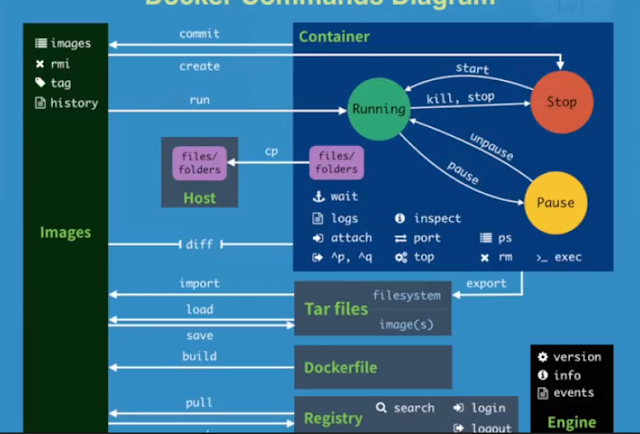
Docker Command

#1 pull images $docker pull chusiang/takaojs1607 #2 list images $docker images #3.1 run docker $docker run -it ### bash #3.2 run do...